Appointment scheduling software: 4 clear steps that refill a slot
The short version
- Appointment scheduling software fills a booked calendar. It does not, on its own, refill a slot a customer gives up late.
- The refill runs on four parts: self-serve rebooking, a waitlist that makes one offer at a time, reminders timed to the customer, and a route to a named owner.
- Reminders do the measurable work. A Cochrane review of seven trials found attendance 11 points higher with a text, and texting matched a phone call for less money.
- Block scheduling protects the staff day. In the one direct comparison, patients in the block clinic waited 8.6 minutes longer.
- Ask three questions before you sign: what holds a slot while one person decides, who owns a cancellation, and which report proves the slot refilled.
At 4:40 on a Tuesday afternoon, a customer cancels tomorrow’s 9:15. The chair stays empty. Reception calls three people, reaches two voicemails, and gives up at half past five.
Most appointment scheduling software did its job at 4:39. It recorded the cancellation, freed the slot and updated the calendar. Everything after that is a second path, and it is the path your money is for.
That is the honest limit of appointment scheduling software. It is good at the booking and silent about the refill.
Appointment scheduling software keeps a schedule full after a late cancellation only when three things run without a person. Self-serve rebooking, a waitlist that offers the slot to one waiting customer, and reminders timed to that customer. A fourth part decides whether anyone can tell it worked: routing the cancellation to a named owner.
Appointment scheduling software fills the calendar, not the gap
A schedule that survives cancellations is not one that reduces cancellations. It is one that stays full when a slot opens late. That sentence is the whole teardown, because the two goals need different parts of the product.
In appointment scheduling software, reducing cancellations is a customer behavior problem. It answers to reminders, clear terms, and a booking made closer to the day. Refilling a slot is an operations problem. It answers to how fast a freed slot reaches somebody who wants it.
Vendors of appointment scheduling software sell the first half well. Calendly’s help center treats the invitation, the reminder and the cancellation policy as settings on the event type. It also lets you attach cancel and reschedule links to both messages (Calendly, How to add a cancellation policy, updated 24 August 2026).
That is a complete booking product. None of it fills the 4:40 slot. Most appointment scheduling software is built to take a booking and keep a diary straight, and it does that well. The refill path is what it leaves half built.
The refill path in appointment scheduling software is where the money sits. Three losses follow every late cancellation, and they arrive in a fixed order.
The three losses a late cancellation creates
The first loss is idle staff time. The person who would have served the customer still works the shift. The hour goes into calls that mostly fail. Most appointment scheduling software reports the cancellation and stops before this line.
The second loss is the slot itself, sold at the price of the service. It is the only loss that shows up as revenue you never had. That makes it the one worth measuring.
The third loss is admin rework. Somebody has to find a replacement, and the search costs calls and messages. It is the smallest loss per event, and it happens every time.
Take a worked example with stated assumptions. No client booking system was available to us for this piece. One reserved slot sits empty for two hours on each of 250 working days. At the May 2025 median wage for receptionists of $18.27 an hour, that costs about $9,135 a year for one desk (US Bureau of Labor Statistics, Occupational Outlook Handbook, May 2025). That figure is our arithmetic, not a client result.
Two hours a day is a lot of idle time for one desk. The number is not the point. The point is that idle time, unfilled slots and rework are three separate lines, and most teams treat them as one problem called no-shows.
What the published data says about missed and refilled slots
The numbers below are published figures from health systems that count appointments carefully. Health is not a salon or a clinic chain, and rates differ by setting. Use them as a size check, not as your own baseline.
| What was measured | Setting and period | Figure | Source and date |
|---|---|---|---|
| Appointments not attended | General practice, England, September 2026 | 89.4% attended, so 10.6% not attended across 35.1 million appointments | NHS England Digital, Appointments in General Practice, published 29 October 2026 |
| Outpatient did not attends | NHS outpatient services, England, 2021/22 | 7.6% of 103 million appointments, about 650,000 slots a month | NHS England, Reducing did not attends in outpatient services, updated 15 August 2023 |
| Attendance with and without a text reminder | Seven trials, 5,841 people | 67.8% attended with no reminder, 78.6% with a text reminder | Cochrane review, CD007458, 2013 |
| Text reminder against a phone call | Three trials, 2,509 people | No meaningful difference: risk ratio 0.99, range 0.95 to 1.02 | Cochrane review, CD007458, 2013 |
Two readings matter here. The first is size. A tenth of appointments in general practice did not happen. The health service treats that as a capacity problem, not a customer one.
The second reading is a gap. Nobody in that table publishes a refill rate. Not the health service, and not the scheduling vendors. Appointment scheduling software will report bookings, cancellations and no-shows, and then stop. Whether the freed slot was sold again is the number you have to build yourself, because it is not a field most appointment scheduling software offers.
The refill path, part by part
Four parts carry a canceled slot back to a paying customer. They run in order, and each one fails in its own way. Any appointment scheduling software you buy will have two of the four. The gap is usually in the same place. The frame is the one in business process automation for operators: a trigger, a rule and a handoff.
Step one: let the customer rebook without calling
Self-serve rebooking means the customer moves their own appointment from a link, with no call and no reply. It sounds like a convenience. It works as a measuring instrument. It is also the cheapest part of appointment scheduling software to switch on, and the one that changes behavior first.
NHS England’s guidance on missed appointments makes the case from the other direction. Patients told the service they were more likely to miss an appointment when canceling was hard. The guidance lists easy cancellation as a first action, next to reminders (NHS England, Reducing did not attends, updated 15 August 2023).
A customer who can cancel in twenty seconds cancels. A customer who cannot cancels by not turning up. The first version leaves you four hours to sell the slot. The second leaves you nothing to sell.
That is why the rebooking link belongs in the reminder as well as the confirmation. Calendly exposes it as a checkbox on the invitation and reminder emails, on paid plans. One setting in appointment scheduling software turns a silent no-show into a notice you can act on.
Step two: a waitlist that offers the slot to one person
A waitlist is a named list of customers who want a time you do not have. It is the feature that separates appointment scheduling software built for service businesses from a shared calendar. It is also the part that decides whether the 4:40 cancellation becomes a booking or a story about a quiet Tuesday.
The mechanics are plainer than the marketing. Acuity Scheduling’s help center describes a waitlist a customer joins from the booking page, with preferred dates and time ranges. When an appointment is canceled or rescheduled, a matching customer gets a text with a booking link (Acuity Scheduling, Offer a waitlist, last updated 13 November 2026). It is the clearest example in appointment scheduling software documentation of a refill offer, and it is worth reading before a demo.
Three details in that documentation are worth more than the feature name. The waitlist sits on the Standard and Premium tiers, not the entry plan. The business sets a minimum number of hours, which decides how late a waitlisted customer can still take a slot. And the business must record that the customer agreed to texts about it.
What the documentation does not describe is a hold.
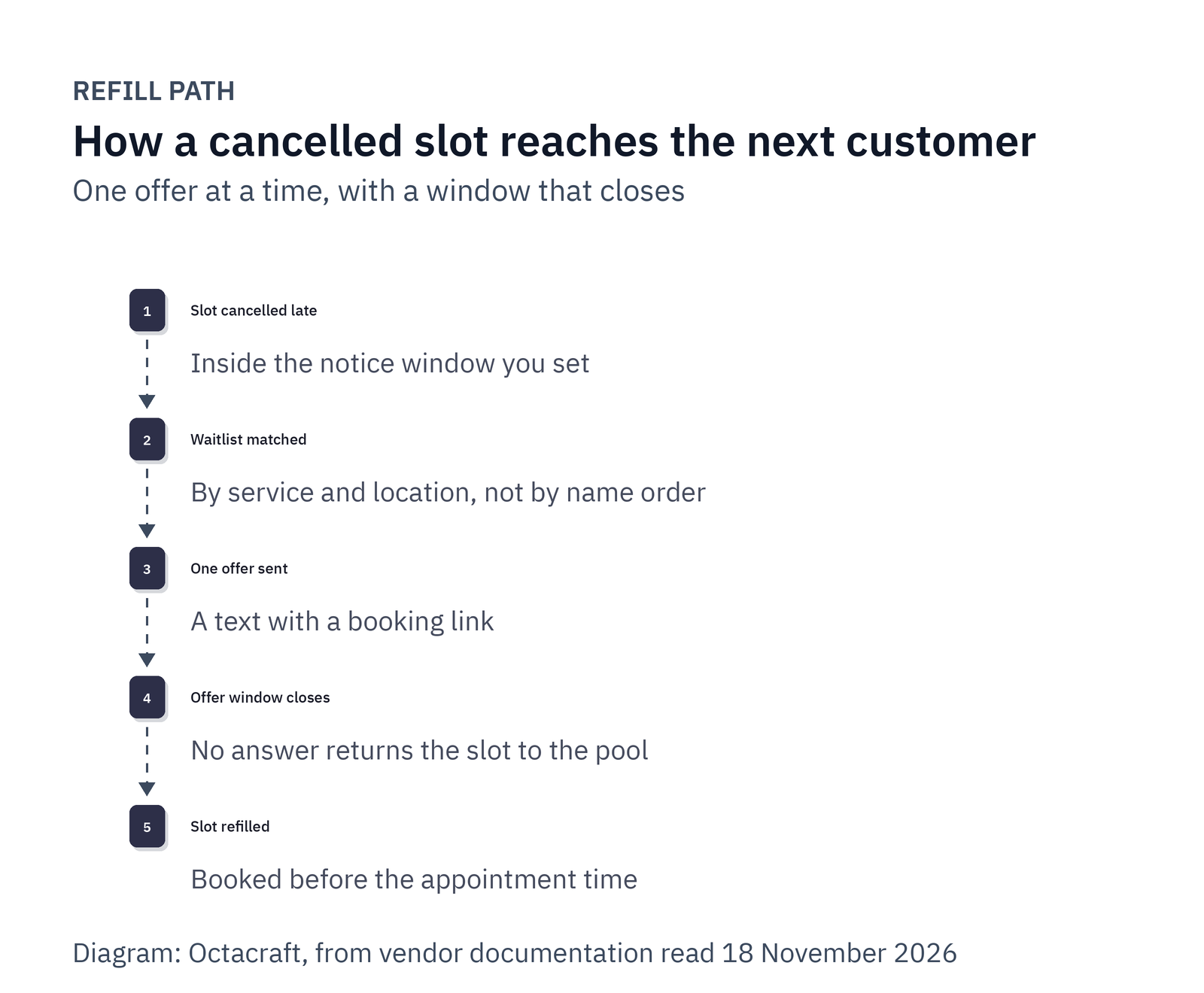
Every matching customer is texted, and the slot goes to whoever taps first. That is fine for a quiet list. On a busy one it produces one booking and a set of customers who were told a slot existed and then lost it.
The fix is a design decision, and it costs nothing to specify. Offer the slot to one customer at a time. Hold it for a fixed window, then move to the next name. A slot held for twenty minutes beats four texts sent at once, because the hold produces one answer instead of four disappointed people.
Step three: time the reminders to the customer
Reminders are the part of appointment scheduling software with the best evidence behind it. The evidence says something narrower than the sales page. Reminder rules are also the most configurable setting in the tool, and the one most teams leave at the default.
A Cochrane review pooled seven trials covering 5,841 people. Attendance was 67.8% with no reminder and 78.6% with a mobile text reminder, a risk ratio of 1.14 (Gurol-Urganci et al., Cochrane Database of Systematic Reviews, CD007458, 2013). Texting matched a phone call almost exactly, at a lower cost per reminder.
That is an eleven point lift, not a cure. The same review says nothing about timing. No trial we found compares reminder timing for service businesses. Treat the timing rule as a hypothesis about your own customers.
Two things are worth building into it. Send the reminder while the customer can still act on it, and put the cancel and rebook links inside the message. NHS England reports better results where the message is two-way and the customer can reply to cancel. It also reports reductions of up to 80% from reminders, which is an upper bound from provider examples, not an average. Volume has a ceiling too, which is the argument in CRM automation that does not annoy customers.
Behaviour timing means one more thing for a service business. A reminder that lands a week early is a notice. A reminder that lands the day before is a decision. The second produces a cancellation you can sell. The first produces a no-show you cannot.
Step four: route the cancellation to an owner
A cancellation that arrives in a shared inbox is a queue, and queues are where refills go to die. The same logic governs why a response time is a queue problem before it is a staffing problem.
Routing means the cancellation lands with a named person who owns that service and that location, with a deadline attached. It sounds like admin. It is the difference between appointment scheduling software that tries and a system that can be judged. Ownership is the part appointment scheduling software cannot configure for you.
Two clocks matter, and appointment scheduling software usually reports neither. The first is minutes from cancellation to offer. The second is minutes from offer to refill. Set a target for both, and you have a queue you can manage, in the way that approval bottlenecks are managed once somebody owns the wait.
What an appointment setter still does better
An appointment setter is a person whose job is to book meetings for somebody else. The work runs by phone, email or message, off a list of leads, and ends with a qualified booking handed to a salesperson. That definition is a secondary source (Indeed Career Guide, What is an appointment setter).
That role does something a waitlist cannot. It persuades. A setter can offer a different time, answer an objection, and decide that a customer is worth holding a slot for. A waitlist texts a link and waits. No appointment scheduling software answers an objection, so the setter keeps that job.
Keep the setter for the slots that carry real value and a real conversation. Use the waitlist for the slots that need a warm body at a fixed hour. The mistake is putting a setter on a waitlist and calling it automation. The offer then takes an hour instead of a minute, and the customer has usually booked elsewhere.
Where the calendar template decides the outcome
Two template rules decide how much a cancellation costs you, long before anyone cancels. Block scheduling decides which gap opens. Round robin scheduling decides who receives the refill. Both are settings in appointment scheduling software, and both are usually left at the default.
Where block scheduling helps, and where it hurts
Block scheduling means reserving a stretch of the day for one type of appointment. Requests are not booked in the order they arrive. A morning may hold four long consultations and no short ones.
In appointment scheduling software, block scheduling is a rule about the template, not a screen. It helps in one clear way. A block gives the person delivering the service an unbroken run of similar work, then open time. Whether your appointment scheduling software applies the rule per service, rather than per day, decides how useful it is.
A study of two hospital clinics found the block clinic produced a wave pattern. The clinician worked through a group without a break, then had a clear gap. The paper’s review of the practice says a block pattern leaves more free time at the end of a session (Zaghloul and Abou El Enein, Journal of Multidisciplinary Healthcare, December 2010).
It hurts in a way that rarely makes the brochure. In that same comparison, new patients waited 27.5 minutes on average in the block clinic, against 18.9 minutes in the standard one. Most patients in both clinics preferred the standard system, 73.3% in one and 55.0% in the other.
So block scheduling is a trade, not an upgrade. It concentrates the damage of a cancellation into one visible gap, which is useful. It also lengthens the wait for everyone in the block, which is the cost. Use it for your longest services, and point the refill path at those blocks.
What round robin scheduling does, and what it does not
Round robin scheduling hands each new booking to the next available person in turn. It is the part of appointment scheduling software that picks a person, not a time. That matters when your staff are the scarce thing rather than your chairs.
Calendly documents two modes, and the difference is the buying decision. Maximize for availability books any host who is free, ranked by priority stars. Optimize for equal distribution hides a host once they are three meetings ahead (Calendly, Round Robin distribution overview, updated 5 October 2026).
That second setting spreads the work and cuts the slots on offer at any moment. Calendly says so itself. Most appointment scheduling software that offers round robin scheduling makes a similar trade, and few state it as plainly.
The trap sits one line further down. A rescheduled round robin meeting is reassigned by default, so a customer who moves their appointment may be handed to a different person. Calendly lets you keep the original host instead. If your customers book because of who they see, change that setting on day one.
Round robin scheduling does one job well and claims no more. It fills a person’s calendar. It does not fill a chair that belongs to a service, and it cannot make a customer accept a time they did not ask for.
What breaks in practice
Five failures account for most of the disappointment with appointment scheduling software, and none of them is a missing feature.
The list is too thin. A waitlist of three names empties in a week. Appointment scheduling software will hold the list; growing it is your job. Keep it several times the size of your daily cancellations, and refresh it when customers book.
The offer has no hold. Texting everyone at once turns a refill into a race. One tap wins, and the rest of the list learns that your texts are not worth answering.
The consent is missing. Acuity’s documentation requires the business to record that the customer agreed to texts about the waitlist. Sending without it is a compliance problem. It is also how a waitlist gets reported as spam.
The fairness cap hides capacity. Calendly’s own note says equal distribution can mean fewer bookings overall, because a host who is ahead has their availability hidden. That is the right trade for fairness and the wrong one for a short-staffed week.
Nobody measures the refill. This failure makes the other four invisible. Without a report of offers and refills, every change to the waitlist is a guess. Appointment scheduling software will not produce that report for you, and the quiet months then look like a product problem.
Who this suits, and who should not buy it
Think of the refill path as a layer on top of appointment scheduling software you already run. It suits a booking business with fixed-length services, three or more people delivering them, and a cancellation rate you can feel in the week’s takings. One location, one service catalogue, and a customer list that rebooks within a season.
It does not suit walk-in trade, where the queue is the schedule. It does not suit emergency slots, which need to stay open by design. And it does not suit the high-value consultation where the relationship decides the time, because a waitlist offer reads as a downgrade. In those settings appointment scheduling software is a diary, not a refill engine.
If you are not sure which side you are on, count last month’s cancellations. Under about one a week, fix the reminders and leave the rest alone. Above that, the refill path in your appointment scheduling software is worth the work.
What to insist on before you sign
Eight checks separate appointment scheduling software that refills slots from software that only records the loss. Ask for each one in writing, in the demo, against your own calendar.
- A cancel and rebook link in every reminder, with the cancellation reason captured.
- A waitlist that offers the slot to one customer at a time, with a hold you can set in minutes.
- A minimum-hours floor you can set per service, so a customer cannot claim a slot ten minutes out.
- Routing rules by service and location, to a named person with a deadline.
- A refill report: cancellations, offers sent, slots refilled, and the two clocks.
- Consent recorded per customer before the first text goes out.
- The per-message cost printed in the quote, not discovered on the first invoice.
- A full export of the booking log, so leaving is possible.
Two more, if your staff are the scarce resource. Set the round robin rescheduling preference to keep the original host. Then check whether the waitlist and the round robin sit on the same plan tier. On Acuity the waitlist starts at Standard. On Calendly, round robin starts at Teams. A quote that includes one and not the other is the mistake that shows up in month two. If a vendor cannot show you the refill report in the demo, the appointment scheduling software does not have it.
The short answer, in one paragraph
Appointment scheduling software records a cancellation. It rarely refills the slot. The refill needs four parts: a rebook link the customer can use in seconds, a waitlist that offers one held slot to one person, a reminder that lands while the customer can still act, and a route to a named owner with two clocks. Measure offers and refills from week one. If the refill rate is flat, the waitlist is a list, not a queue.
Frequently asked questions
What is appointment scheduling software?
Appointment scheduling software holds a bookable calendar, takes a booking from a customer, and sends confirmations and reminders. Most tools add cancellation links, waitlists and rules that decide which staff member gets the booking. It is a booking system first. Refilling a slot a customer gives up late is a separate job.
Does appointment scheduling software reduce no-shows?
Only partly. The measurable gain comes from reminders, not from the calendar. A Cochrane review of seven trials found attendance at 78.6% with a text reminder against 67.8% without one. Add a cancel and rebook link to the same message and some no-shows become cancellations you can sell.
What is a good slot fill rate after a cancellation?
No published benchmark covers service businesses, and the appointment scheduling software vendors do not report one. Set your own target: offers sent within ten minutes, and half of late cancellations refilled before the appointment time. Then read the figure weekly. A refill that lands after the slot has passed is a booking, not a recovered slot.
Should we charge customers for late cancellations?
That is a policy decision, not a software one. A stated cancellation policy can sit in the confirmation and the reminder, which Calendly supports as a text block. Charge only where you can enforce it without a fight. Expect the charge to reduce the number of customers who cancel early, and early notice is what makes a slot sellable.
Can a waitlist replace an appointment setter?
No. A waitlist makes an offer to somebody who already said they wanted a time. An appointment setter works a list of people who have not asked yet, and persuades them. Use the waitlist for freed slots and the setter for new demand. Replacing the second with the first cuts bookings rather than saving staff time.
A slot that refills in ten minutes is a booking system working. A slot that refills next Tuesday is a calendar with good manners. If you want the refill path mapped onto your own booking data, tell us where your cancellations arrive and who owns them. We will say whether the fix is a waitlist rule, a reminder change or one named owner.
Philip Bassey is Octacraft’s Chief of Staff. He keeps the work between a system going live and a team trusting it, and writes about the process detail that decides whether an automation holds on a bad week.

Philip Bassey is Chief of Staff at Octacraft, where he oversees the interdepartmental activities that keep our processes documented and the ones worth publishing published. He writes about operations that are engineered into systems instead of held together by memory.