CRM automation that doesn’t annoy your customers
The short version
- CRM automation is safe when it changes the record and the buyer never notices. Routing, tasks, field updates, reminders and reporting all sit on that side of the line.
- The drift rarely comes from thirty bad rules. It comes from three kinds of CRM automation: a workflow set to re-enroll, a sequence that keeps sending after a reply, and a stage that advances on a timer.
- Set four rules first. Route by territory, create a task with a due date the rep can move, move stages on evidence, and flag quiet deals to their owner.
- One automated message before a human reply is the limit. A second one is noise, and it is the one the buyer quotes back to you.
- Four things stay manual for good: discount approvals, contract terms, anything sent during a dispute, and the first reply to a named account.
The reply rate drifts down a point or two and nobody has touched the copy. Somewhere in the CRM, a rule is working a record it should have left alone.
That is the usual shape of the problem. CRM automation does not annoy buyers because it exists. It annoys them when a rule keeps going after a person should have taken over. The buyer sees the machine behind the message and stops answering.
This piece separates the half of CRM automation that helps a sales team from the half that costs it deals, rule by rule. It is written for the sales lead who already has automation switched on and wants to know which rules to keep. Every platform claim here was checked against vendor documentation on 13 November 2026.
CRM automation: the line that decides everything
CRM automation covers the rules inside the CRM that create tasks, assign owners, update fields, send messages or start a sequence when a record changes. The rules that keep a buyer comfortable work on the record. The rules that lose one work on the buyer.
A definition worth keeping: CRM automation is software that reacts to a change in a customer record by doing a defined action without a person starting it. That is deliberately narrow. It is not a chatbot, and it is not a license you buy on its own.
The distinction matters because both halves live in the same tool. A rule that routes a lead and a rule that emails a buyer are both a trigger plus an action. Nothing in the builder tells you that one is safe and the other is a risk. Only the recipient knows.
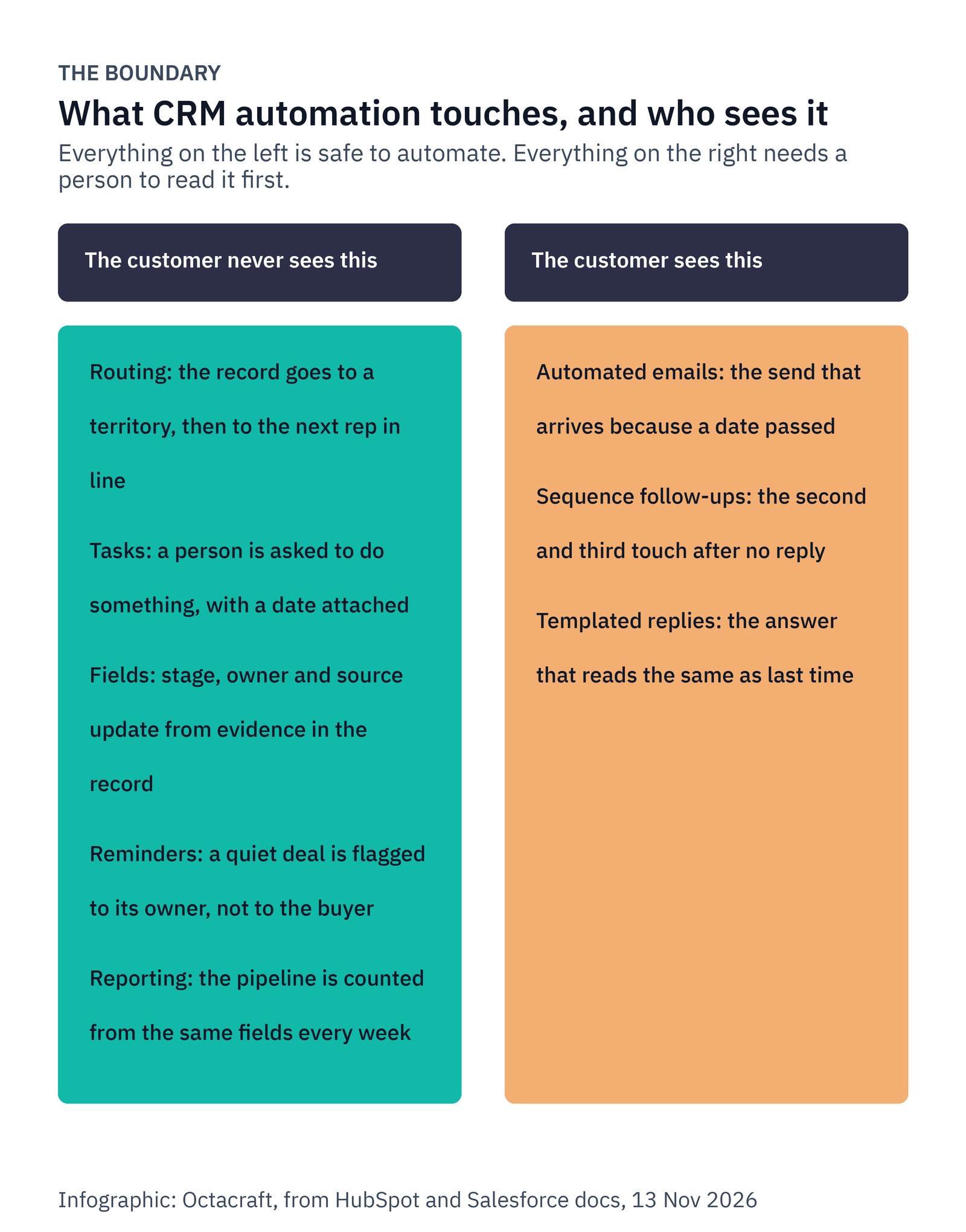
Everything on the left can run every day and the buyer will never know. Everything on the right reaches a person deciding whether to answer you. That is why one rule base can be excellent internally and damaging externally. It is also why any audit of CRM automation starts on the right.
How CRM automation starts annoying buyers
Three mechanisms cause most of the damage. A workflow with re-enrollment switched on. A sequence that keeps sending after a reply. A deal stage that moves because time passed. Most CRM automation failures trace back to one of those three settings, and each one keeps acting after the buyer has answered.
The workflow that never stops enrolling
By default, a record enters a workflow once. HubSpot’s documentation is explicit: records enroll the first time they meet the triggers, and re-enrollment triggers exist to let them enter again (HubSpot Knowledge Base, updated 30 October 2026).
Turn re-enrollment on and the risk changes shape. A record that meets any one selected trigger re-enrolls. The tool cannot combine triggers with AND logic. On re-entry the record starts from the beginning and runs every action again, automated emails included. A lifecycle field edited by two teams can send the same email twice in a week.
That is the first place to look when a customer says they got the same note twice. It is invisible in the editor, because the workflow itself looks correct. The enrollment setting sits on a separate tab, and that tab is the one nobody reopens.
The sequence that keeps sending after a reply
Sequence tools can stop when someone answers, and the stop is a switch. HubSpot unenrolls a contact who replies only when the reply switch is on (HubSpot Knowledge Base, updated 30 September 2026). Out-of-office replies are usually excluded, which is the right call. It also means the switch does less than people assume.
Two failure modes follow. The switch is off and nobody checked. Or the reply lands in a colleague’s inbox and the sequence never sees it. In both cases the buyer has answered and the next automated email arrives anyway. From the buyer’s side that is not a timing problem. It is evidence that the reply was never read.
The legal floor sits under this too. The FTC’s CAN-SPAM guide covers business-to-business email and requires a working opt-out. A request must be honored within 10 business days, with the mechanism live for at least 30 days after a send (FTC, August 2023, edited January 2024). A sequence that ignores a reply is one step from a sequence that ignores an opt-out.
The stage that moves on a timer
CRM automation that advances a deal stage after a set number of days is the quietest of the three. Nothing reaches the buyer, so nothing looks wrong. The record simply says the deal is further along than it is.
The cost lands later. The forecast rests on stages that mean seven days passed rather than the buyer asked for a proposal. The sales lead then defends numbers the CRM invented, and nobody suspects the rules that produced them.
The four rules to set first, and why each is shaped that way
Route by territory and then round robin. Create a task with a due date the rep can move. Move the stage from evidence in the record. Flag a quiet deal to its owner. None of the four sends anything to a buyer, and together they remove most of the daily sorting a sales team does by hand. These four pieces of CRM automation are the whole foundation.
Rule 1: route by territory, then round robin, not by whoever reacts fastest
Salesforce describes assignment rules as criteria that sort, queue or act on leads automatically (Salesforce Help, read 13 November 2026). HubSpot’s equivalent action, rotate record to owner, assigns records equally inside a selected team or between named users (HubSpot Knowledge Base, updated 26 October 2026).
Put the territory first and the rotation second. Territory is a fact about the buyer, so it belongs in the criteria. The rotation is a fairness rule about your team, so it belongs in the action. Reverse them and a lead in a region nobody covers goes to whoever is next in line. That is how a Nairobi inquiry ends up with the rep who handles Lagos.
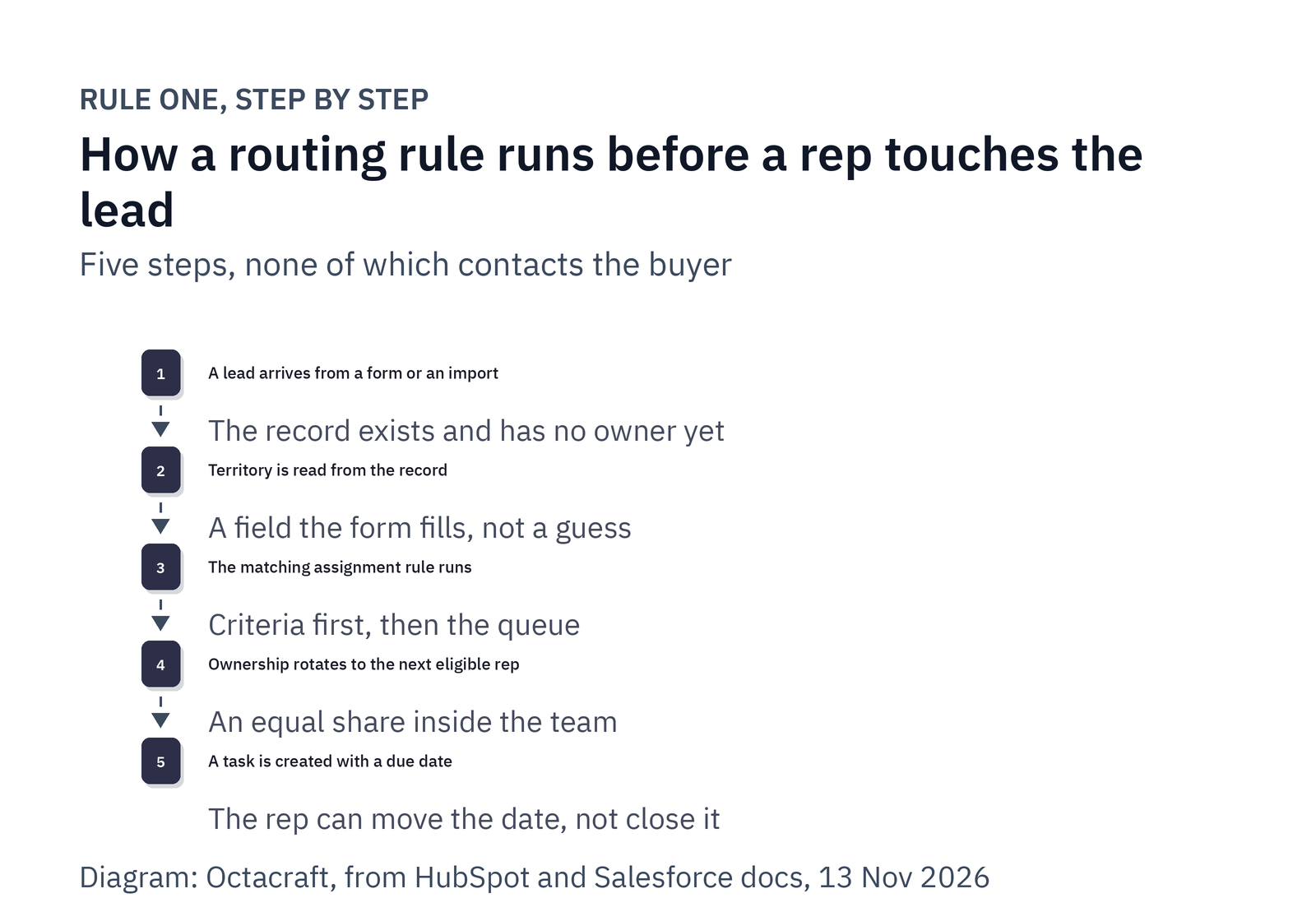
The fifth step is the one teams skip. A routed lead with no task is a record someone finds on Friday afternoon. The task is what turns ownership into work.
Rule 2: create a task with a due date the rep can move
The task action creates work for a person without touching the buyer. That makes it the cheapest useful piece of CRM automation in the system. Give it a due date and let the rep move that date. The date is a prompt, not a promise to the customer.
Two settings are worth naming. Do not auto-close a task when the due date passes, because a task closed by a clock hides work that was never done. Create one task per step rather than five at once. Five tasks due today get closed in a batch at 6pm without a call being made.
Rule 3: move the stage from evidence in the record
Pick the events that count as progress and let those move the stage. A meeting logged, a proposal sent, a security review booked. Evidence-based stages make the pipeline readable. The field then means something a person did rather than something a calendar did.
This rule also gives the quiet-deal check something honest to measure. Evidence-based CRM automation is rarer than it sounds. A deal that has not moved on evidence is stalled. A deal that has not moved because the timer broke is a support ticket.
Rule 4: flag a quiet deal to its owner
When a deal goes a set number of days without activity, notify the owner. Not the buyer. The notification is an internal email or an in-app alert, and its job is to reopen a conversation that stopped.
Keep it to one notification per quiet period. A daily reminder about the same deal trains the owner to ignore it. That costs you the one alert that mattered. This is also the only piece of CRM automation here that reacts to nothing happening.
CRM automation tools: what to check before you buy
Check four settings inside the tool you already own before you compare feature lists. Does a sequence stop on reply, and is that switch on. Is every automated send logged on the record. Can a rule exclude records as well as include them. Does re-enrollment exist, and is it off. That is a short test of the CRM automation tools you already pay for, and failing it is why teams shop for a replacement they do not need.
What a workflow automation CRM rule is made of
Every rule has the same four parts. A trigger that says when to look, conditions that say which records qualify, an action that changes something, and a repeat setting. Read all four before you switch a rule on. Most of the damage in this piece comes from the fourth part. It sits on a separate tab and gets opened once.
Marketing CRM automation: the half that touches the buyer
Marketing CRM automation sends: campaigns, nurture emails, re-engagement notes. It carries your reputation, and the constraints on it are external. Gmail’s sender guidelines, in force since 1 February 2024, ask every sender to keep the spam rate below 0.3%. Senders above 5,000 messages a day must also support one-click unsubscribe (Gmail Help, read 13 November 2026).
Below those thresholds the rule is simpler than the platforms and stricter. Send one automated message, then wait for a person. Marketing CRM automation works when it is aimed at people who asked for something. It fails when it is aimed at people who matched a filter.
CRM sales automation: what to hand over first
Hand over the sorting, not the talking. CRM sales automation earns its keep on routing, task creation, note writing, field updates, reminders and pipeline reporting. All of that is record work, and none of it needs the buyer to notice.
First-touch emails, answers to a named account and anything written in the company’s voice stay with a person. Keep them there until you have watched the rule behave for a quarter. If the order of first steps is unclear, five operations to hand over first ranks candidate work by payback and by how badly it fails.
Do this, not that: seven automations, two versions
Each of the seven CRM automation types below has a version that helps a rep and a version that costs a deal. The difference is almost always whether the action lands on the record or on the buyer.
| Automation | Do this | Not that | Why it matters |
|---|---|---|---|
| Lead routing | Match the territory first, then rotate inside the team | Send every lead to whoever clicks fastest | A record with no owner waits, and a buyer called by two reps stops answering |
| Follow-up cadence | Two automated touches, then a task for a person | Six emails ending with a check-in note | The third email is the one that gets marked as spam |
| Stage change | Move the stage when a meeting or a proposal is logged | Move it after seven days of nothing | A timer invents progress that the forecast then pays for |
| Task assignment | One task with a date the rep can move | Five tasks all due today | Stacked tasks get closed in a batch without the call being made |
| Notifications | Flag a quiet deal to its owner | Email the buyer because the deal went quiet | One is a nudge to your team, the other is a reminder that you are watching |
| Data enrichment | Fill fields from the form and the record | Fill fields from a guess or a script | Wrong data routes the next lead to the wrong rep |
| Reporting | Count from the fields the rules maintain | Rebuild the report by hand each month | Two number systems mean the meeting argues about which one is right |
How much contact is too much?
One automated message before a human reply is tolerable. A second one is noise. Anything that arrives after the buyer has answered is worse than silence, because it proves the answer was not read. Most complaints about CRM automation come from that second message.
Three signals tell you which side of that line your CRM automation sits on. Compare the reply timestamp with the sequence step that followed it. Read the unsubscribe reasons rather than the count. Watch the domain’s spam rate against the 0.3% line the mailbox providers publish.
Then run the check once a quarter, on every active sequence, and write down what each one is for. A quarterly review of CRM automation is the cheapest control you have. A sequence nobody can explain is a sequence nobody will turn off. The follow-up gap that costs mid-size firms deals covers the arithmetic of what a slow follow-up costs.
What stays manual, permanently
Four categories do not move, at any level of maturity. A discount beyond the approved band, because it is a commercial decision. Contract terms, because they carry liability. Anything sent during a dispute, because tone decides the outcome. And the first reply to a named account, because that is where a person proves there is a person.
CRM automation can prepare all four. It can draft the discount request, flag the clause that changed, pull the account history and put the reply in front of the owner. It should not send. The difference between a fast sales team and an automated one is who presses the button on those four.
What breaks
This approach fails in three places. Routing needs a territory field on every record, so a form that leaves it empty routes nothing. Stages need reps who log calls, because evidence-based stages on an unlogged pipeline read as a dead quarter. Quiet-deal alerts need a threshold that matches your sales cycle, since seven days is noise on a nine-month deal.
None of the three is a reason to automate the contact layer instead. They are the maintenance cost of the record layer, and it is smaller than the cost of a buyer who stops replying. CRM automation is only as timely as the record it reads. If your process crosses two systems before a rep sees it, the handoff is where automation stalls. Response time is a queue problem more often than a writing problem, and the same holds for leads.
One more limit. A CRM records what people type into it. If the team works from a shared inbox and updates the CRM on Friday, no rule can be timely. Fix the logging habit before adding another workflow. AI workflow automation against RPA and Zapier is a fair comparison here, because it separates what a rule can do from what an agent can do.
Frequently asked questions
What is CRM automation in simple terms?
CRM automation is the work a CRM does by itself when a record changes: creating tasks, assigning owners, updating fields, sending a message or starting a sequence. It is configuration inside the CRM your team already uses, not a separate product. The useful test is whether the result lands on the record or on the buyer.
Which CRM automations annoy customers most?
Automated emails that land after the buyer has replied, follow-up sequences that keep running, and templated replies that ignore what was asked. Each one tells the buyer that nobody read the message. Routing, task creation and reminders are internal, and they almost never cause the complaint.
Should a follow-up sequence stop when a prospect replies?
Yes. HubSpot sequences offer a reply switch that unenrolls a contact who answers. It is a setting rather than a guarantee, so check it on every sequence. Also check the case where the reply goes to a colleague rather than the sender, because the sequence never sees that reply.
How many automated emails can you send before a human reply?
One. A single automated touch before a person answers is tolerable. A second one, sent while the buyer waits, reads as a machine and is the message people complain about. After that point the next contact should come from a named person who has read the thread.
Is CRM automation worth it for a 100-person firm?
Usually yes, on the record side. Routing and task creation remove the daily sorting, and reporting stops being a manual job at month end. The payback shrinks if reps do not log calls, because a rule can only act on what the record holds. Fix the logging habit first.
Related reading: the automated touch that most often misfires is the reminder for a booked appointment. Appointment scheduling software: the refill path, part by part covers what a cancellation link and a waitlist with a hold should do, and where a second message crosses from helpful into noise. The same assignment question sits behind a support queue, and help desk software routing sets out what a routing rule should read, why a re-routed ticket restarts the wait, and the re-route share to watch.
If rules are already running in your CRM and nobody remembers why, we will read them with you: talk to us about a build and we will map what fires today and name the three rules to switch off first.

Philip Bassey is Chief of Staff at Octacraft, where he oversees the interdepartmental activities that keep our processes documented and the ones worth publishing published. He writes about operations that are engineered into systems instead of held together by memory.