
Business process automation for operators, not consultants
The short version on business process automation
- Business process automation is the work a system does when a defined process would otherwise move between people by email, spreadsheet and memory.
- Every automated process has three parts: a trigger, the rules, and a handoff. Most projects start with the tool and never write the rules down.
- In business process automation, handoffs add waiting, not work. The delay sits between the steps, where nobody is doing anything.
- The order matters: stabilize, document, build. Skip the second stage and you buy software for a mess.
- Compare the manual cost with a loaded hourly figure, $46.89 for US private industry in June 2026, before you sign anything.
Your finance director forwards a forty-slide deck about business process automation. Slide nine has a maturity curve. Slide fourteen has a price. No slide mentions the four days an invoice spends waiting for a signature in an inbox.
That gap is where operators get stuck. The deck sells a category. Your job is a process with a person who owns it and a decision in the middle.
This page is the working version. You will finish with a definition you can defend in a meeting, a one-page map of one of your own processes, and a stated order for fixing it.
What business process automation means in plain terms
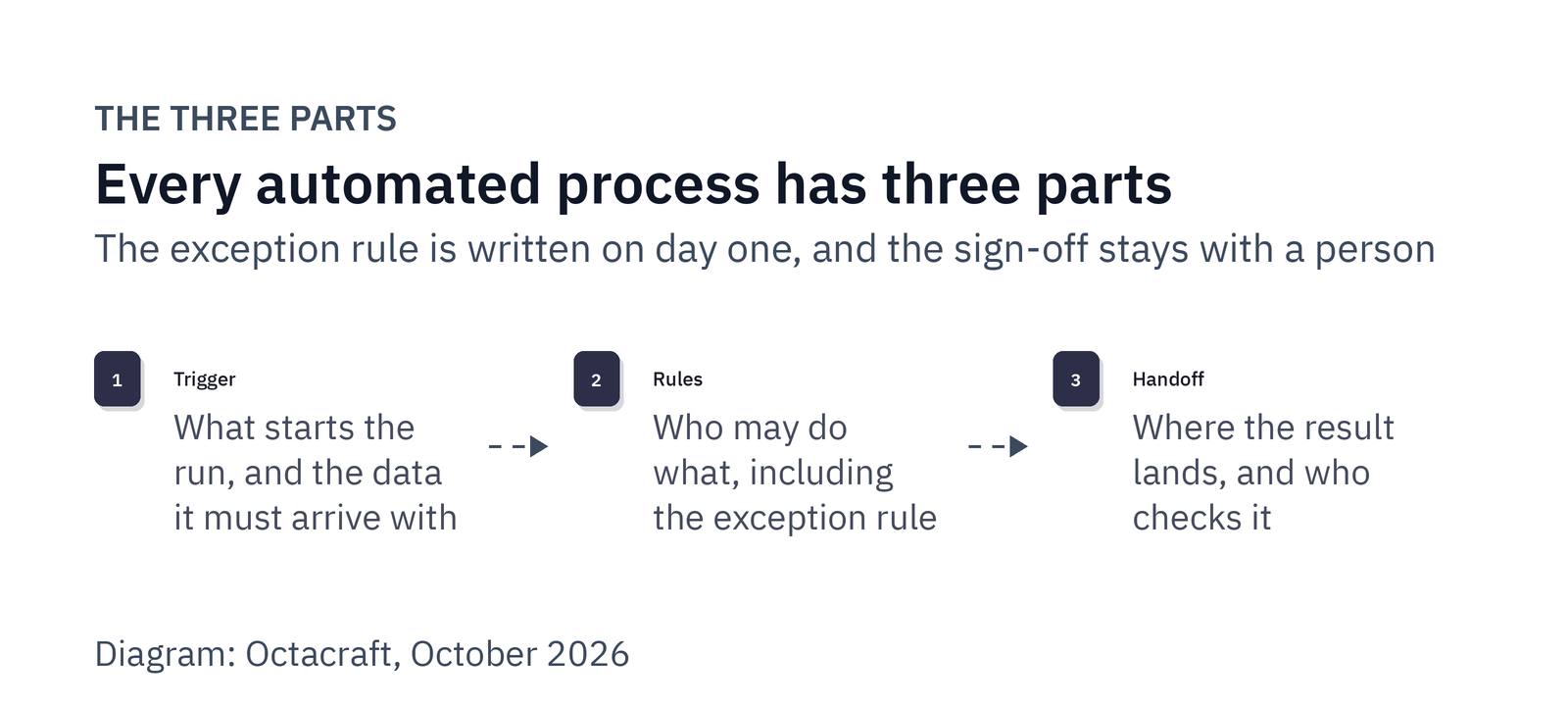
Business process automation is the work a system does when a defined process would otherwise move between people by email, spreadsheet and memory. It has three parts: a trigger that starts the run, rules that decide what happens, and a handoff that puts the result somewhere a person can check. It is not a chatbot. It is not a license you buy.
The test I use with an operations team is this. Business process automation is a process that runs without a person carrying it from step to step.
If a process only moves because someone remembers to move it, you have a process with a person inside it. Automation cannot start until you can name that person and the moment they act.
Four words carry most of the meaning in business process automation, and most projects fail on one of them. Start. Finish. Owner. Decision.
Start is the trigger event: an invoice arriving, a form submitted, a stock level crossing a line. Finish is what “done” looks like, in a form you can check. Owner is the single person accountable when the process stalls. Decision is the point where a judgment gets made, and it needs a name too.
Define business process automation in one sentence you can defend
Write your definition of business process automation once, in your own words, and pin it to the project. A version that survives a finance review looks like this: it is the set of rules that moves a defined piece of work from its trigger to its checkable finish without a person carrying it.
Three things make that definition of business process automation defensible. It names a trigger. It names a finish. It says who does not carry the work any more. A definition missing any of the three is a slogan, and the first review meeting will pull it apart.
Keep it short enough to quote without editing. The sentence above runs to 27 words, which is a length an answer engine can lift whole.
What it is not
It is not artificial intelligence. A rule that fires on a known condition is older than the web and cheaper than a model call. Most business process automation in a 200-person firm is a decision table, not a neural network. If you want the agent side of that line, our teardown of what an AI agent can own end to end covers where it breaks.
It is not a chatbot. A chatbot answers. Automation moves work and writes the result into a system.
Business process automation is not a tool you buy on a card. The tool is the last 20 percent. The definition of the process is the project, and you can do that part before you speak to a vendor.
The three parts of every automated process: trigger, rules, handoff
Every business process automation build has the same skeleton, whether it runs on a low-code platform or on a script someone wrote in 2019. A trigger starts it. Rules decide what happens next. A handoff puts the output where a person or another system can use it.
The exception rule you write on day one
The exception rule is the part of business process automation that teams skip, and it decides whether month two is calm. It answers one question. When the input does not match the expected shape, what happens?
An invoice with two purchase order numbers. A supplier in a currency the system does not carry. A customer who exists twice. Each of these is normal in a real process, and none of them appear in a demo.
Write the exception rule before the happy path. The rule is not “send an error email”. It is a named queue, a named reader, and a stated time to respond. Without those three, exceptions land in a personal inbox and the process is manual again, with extra steps.
The decision you never put in code
One decision in most processes should stay with a person. It is usually the one with a consequence attached: approving a payment, releasing an order on credit, signing off a quality result, accepting a supplier who failed a check.
That decision stays human for two reasons. It carries liability, and the rule behind it shifts with context in ways a decision table cannot hold for long. You can automate everything around it: the gathering, the checking, the drafting, the routing. The signature is the boundary.
Most business process automation that disappoints in year one moved the signature into the code. It then discovered it needed a person anyway, at a worse moment.
What is an example of a business process automation?
A supplier invoice arrives by email. A rule reads the supplier, the amount and the purchase order number. It matches the invoice to the order, then either codes it for payment or sends it to a named person with the mismatch shown. Nobody rekeys the invoice. That is one example of business process automation, and it is where most firms should start.
The detail that matters is not the reading. It is the named person on the mismatch and the audit line that records who approved what. Remove either and you have a faster way to make an unaudited payment.
Business process automation examples you can check against your own desk
Three business process automation examples cover most of what a 150 to 250 person firm asks for. Each starts with a document or a message and ends with a record a person can check in under a minute.
Supplier onboarding. A new supplier’s details arrive with the first invoice, are checked against the tax record, and land in the payee list with a named approver. The judgment that stays human is any supplier the checks cannot confirm.
New starter setup. A signed offer triggers the account, the payroll record, the equipment request and the first-week schedule. The failure mode is a missing step nobody owns, so the checklist is the asset.
Order intake from email. The order is read into the order system, priced from the current list, and confirmed back. The judgment that stays human is any discount outside the standard band.
Business process modeling on one page, without the notation degree
Business process modeling has a reputation problem, and the reputation comes from the notation rather than the work. There is a real standard: BPMN 2.0.2 from the Object Management Group, released in January 2014 and ratified as ISO/IEC 19510. It has dozens of symbols and a specification of several hundred pages.
You do not need it. Modeling a process for automation needs boxes, arrows, and one lane per role. If a step changes hands, draw the arrow and write the wait beside it. If a decision branches, draw two arrows and label the condition.
There is a useful detail in ISO 9001 that most vendors skip. Clause 4.4 asks an organization to maintain documented information “to the extent necessary to support the operation of processes”. ISO’s own guidance on that clause says documented process mapping tools are not a requirement of the standard. It wants evidence that the process runs as planned, not a diagram in a house style.
That frees you. One page, drawn badly, that a new hire can follow, beats a forty-page model nobody opens. The rule I use: if the process cannot be drawn on one page, it is not yet understood, and no amount of business process automation fixes an understanding problem.
Where the time goes in a manual process
Most of the delay in a manual process is not work. It is waiting, and it sits between the steps where nobody is doing anything at all.
The arithmetic is old and it holds. In 1961 John Little proved that the average number of items in a system equals the rate they arrive multiplied by the time each one spends inside. Twelve invoices sitting in an inbox, with three arriving a day, means each one waits about four days on average.
Put the two numbers beside each other. Reading and coding an invoice takes six minutes. The four days is the cost, and it does not appear in anyone’s timesheet. A business process automation case that counts only touch time flatters itself.
This is why handoffs decide the outcome in business process automation. Every handoff adds a queue, and every queue adds a wait that grows with how busy the receiving person is. A process with six handoffs is six queues deep, and the last one inherits every delay in front of it.
The handoff audit takes an hour, and it is the cheapest part of business process automation. List every handoff in one process: who passes it, who receives it, and the average wait in working hours. Do not estimate the wait from memory. Pull twenty recent items and count the timestamps. The largest number on that list is where the project should start.
The order we automate in: stabilize, document, build
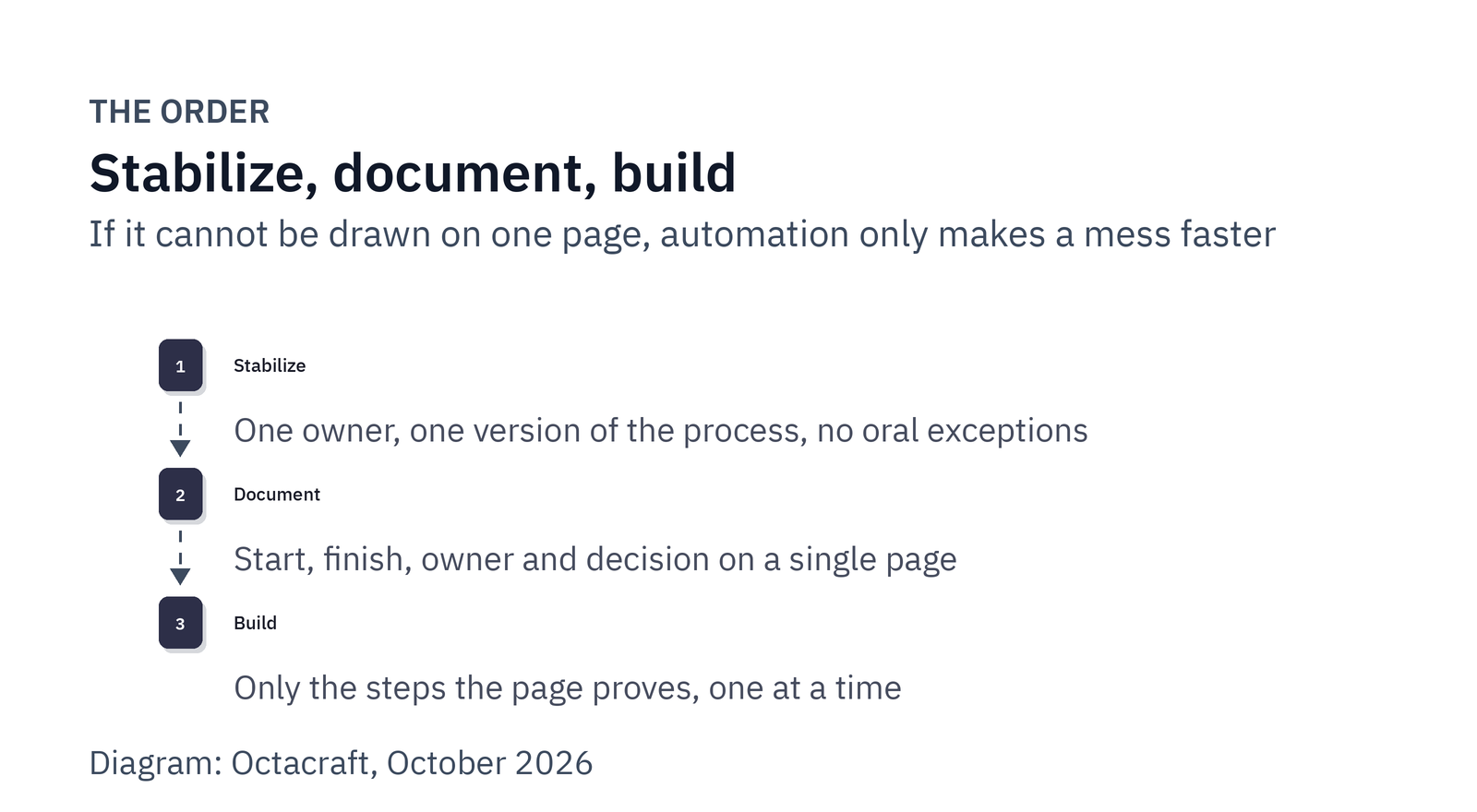
Three stages of business process automation, in this order. Skipping the middle one is the most expensive mistake we see, because it buys software for a process nobody can describe.
Stage 1: stabilize
Stabilize means one owner, one version of the process, and no exceptions that live only in someone’s head. The input is the process as it runs today. The owner is the process owner, named in the plan. The output is a list of the variations: the three ways people handle a partial delivery, the two ways a discount gets approved.
Expect this stage to be uncomfortable. It usually reveals that two teams run the same process differently and both believe theirs is the standard. That conversation is the work, and it is cheaper now than after go-live.
Stage 2: document
Document means the one page. Start, finish, owner, decision, exceptions, and the wait beside every arrow. The owner is the process owner, with one reviewer from the team that receives the handoff. The output is a page a new hire can follow without asking.
Test it by handing the page to someone outside the process and asking them to walk one item through it. Every question they ask is a gap. This is the stage that ISO 9001 clause 4.4 points at, and it is the stage most projects skip because it produces no demo.
Stage 3: build
Build means automating the steps the page proves are worth automating, in the order the waits justify. The input is the page and the wait list. The owner is whoever will run the system in month twelve, not the person who is excited about it in month one. The output is one automated step, live, with an exception queue that has a named reader.
One step is the right size for a first business process automation build. Not a platform, not a suite. One step, measured for a month, with the exception rate counted.
Workflow automation examples that are one step, not a project
Workflow automation examples worth copying are small. A form submission that creates a record and notifies one person. A document that gets renamed, filed and indexed on arrival. A status message sent when an approval passes a threshold. A reminder that fires when an item has sat in a queue for two days.
Each of those is one trigger, one or two rules, one handoff. Each can be live in a week. The compound version, where twelve steps run in sequence, is what you build in month six, after the small ones have taught you where the exceptions live.
Where the path branches: three decisions before you build
Three forks stop most business process automation projects, and each has a defensible answer.
The first is remove or replace. Before automating a step, ask whether the step should exist. An approval that nobody has refused in two years is a delay with a signature on it. Removing it is cheaper than automating it, and it is a real option that vendors do not raise.
The second is integrate or imitate. If the system has an interface, connect to it. If it does not, screen automation can drive the old interface the way a person does. Imitation is faster to build and more fragile to change, so it belongs on systems that are not about to be replaced.
The third is who reads the exceptions. Name the person before go-live. If the answer is “whoever notices”, the queue will grow until someone notices the queue. Our notes on smart systems and automation collect the same material from other processes.
Who owns what, and how often
Four stages carry a business process automation project, and each has one named owner. None of those owners is the vendor, and none of them is a team.
| Stage | Owner | What they produce | Cadence |
|---|---|---|---|
| Stabilize | Process owner | The variation list, agreed by both teams | Once, then when the process changes |
| Document | Process owner and one reviewer from the receiving team | The one-page map with waits beside every arrow | Once, then reviewed each quarter |
| Build | Whoever runs the system in month twelve | One live step and a named exception queue | Weekly for the first month |
| Measure | Process owner | Cycle time, touch time, exception rate, rework hours | Monthly, reported beside the old numbers |
What to measure, and the number to compare it with
Four numbers decide whether the work paid. Cycle time, from trigger to checkable finish. Touch time, the minutes a person spends. Exception rate, the share of items that reach the queue. Rework hours, the time spent correcting what the process got wrong.
Compare them with a cost you can defend. The US Bureau of Labor Statistics put employer compensation costs for private industry at $46.89 per hour worked in June 2026, released on September 9, 2026. For full-time workers in professional and business services, the figure is $63.30.
Use the loaded figure, not a salary. A step that consumes four hours a week at $63.30 costs $13,166 a year. That is the number the build has to beat, and it is the number a business case usually gets wrong by counting a wage instead of a cost.
Then measure the wait separately. A process that gets faster at the work and keeps the same wait has not improved the thing your customer feels. That split is where most business process automation claims fall apart, and it is the first question I ask about any before-and-after slide.
The advantages of business process automation, and the ones vendors oversell
Microsoft’s page on the subject lists six advantages: operational efficiency, standardization and compliance, visibility, scalability, employee and customer satisfaction, and better data management. It is a fair list from a company that sells the tooling, and it is worth separating the claims that hold from the ones that are conditional.
Standardization holds, and it is the advantage you feel first. A defined workflow runs the same way on a Friday afternoon as on a Tuesday morning, and the audit trail is a byproduct rather than a project.
Visibility holds, with a caveat. Instrumented steps produce data. Steps that were never instrumented produce a gap that looks like a clean process.
Satisfaction is conditional. People who spend a day rekeying invoices do not miss it. People who lose the small judgment calls that made the job interesting will tell you so, and their resistance is a real risk rather than a change-management formality.
Scalability is the most oversold advantage of business process automation. Volume scales when the exception rate stays low. If one item in five reaches a person, growth adds headcount at the queue, and the advantage disappears at the volume where you needed it most.
The honest case is narrower than the marketing and easier to defend. Business process automation buys a shorter wait, a consistent record, and a named queue. It does not buy judgment, and it does not remove the need to own the process.
What to ask before you agree to a project
Five questions, in the buyer’s words. Ask them before a proposal, and listen for whether the answer is specific.
Which process, exactly, and who owns it today? A vendor who cannot name the process owner has not understood your organization.
What does the exception queue look like, and who reads it? If the answer is a shared inbox, you are buying a faster route to a manual step.
What happens when a system changes its interface? This separates integration from imitation, and it decides your maintenance line.
What will you measure in month one, and what number counts as failure? A pilot without a failure number is a demo with a longer calendar.
Who maintains this in year two, and what does that cost? The second-year number surprises buyers more than the build does.
Then insist on three definitions in writing before go-live: the trigger, the finish, and the exception rule. Those three sentences are the contract the rest of the project hangs on.
Where this fails
Three failures account for most of the disappointment in business process automation, and all three are visible before a line of code.
The first is automating a process nobody owns. Two teams, two versions, one system. The build encodes whichever version the analyst heard first, and the other team routes around it.
The second is burying the exception rule in code. The rule changes in March, the code changes in June, and in between a person works around the system by email. That workaround is the real process, and nobody has drawn it.
The third is measuring the demo instead of the month. A clean demo proves the happy path. The month proves the exception rate, and the exception rate decides whether the queue is a job or a nuisance.
Frequently asked questions
What is business process automation?
Business process automation is the work a system does when a defined process would otherwise move between people by email, spreadsheet and memory. It has three parts: a trigger, the rules, and a handoff. It is rule-based software rather than artificial intelligence, and it is not a chatbot.
What is an example of a business process automation?
A supplier invoice arrives by email. A rule matches it to its purchase order, and the system either codes it for payment or sends it to a named person with the mismatch shown. Nobody rekeys the invoice. That is the most common business process automation example in a 200-person firm.
How is business process automation different from robotic process automation?
Robotic process automation drives an existing screen the way a person would, which suits old systems with no interface. Business process automation is the wider idea: the trigger, the rules, the handoff and the record. Most projects need a mix of both, and the process definition comes before either one.
Do we need BPMN to model a process?
No. BPMN 2.0.2 is the formal standard, ratified as ISO/IEC 19510, and it earns its keep when two organizations have to read the same diagram. For one internal process, boxes, arrows and a lane per role on a single page do the job.
How long does a first process take?
Expect three to six weeks for one step, with most of the time in the document stage rather than the build. A first business process automation project that runs past a quarter has usually widened its scope without saying so.
If you want a next step rather than another definition, pick one process this week and list its handoffs with the wait beside each one. That hour produces the only number you need to choose where to start.
When you want to see how that plays out on an operations desk, our Timeback page shows the pattern in practice.

Philip Bassey is Chief of Staff at Octacraft, where he oversees the interdepartmental activities that keep our processes documented and the ones worth publishing published. He writes about operations that are engineered into systems instead of held together by memory.

7 Comments