HR admin automation: what’s safe and what needs a human
The short version
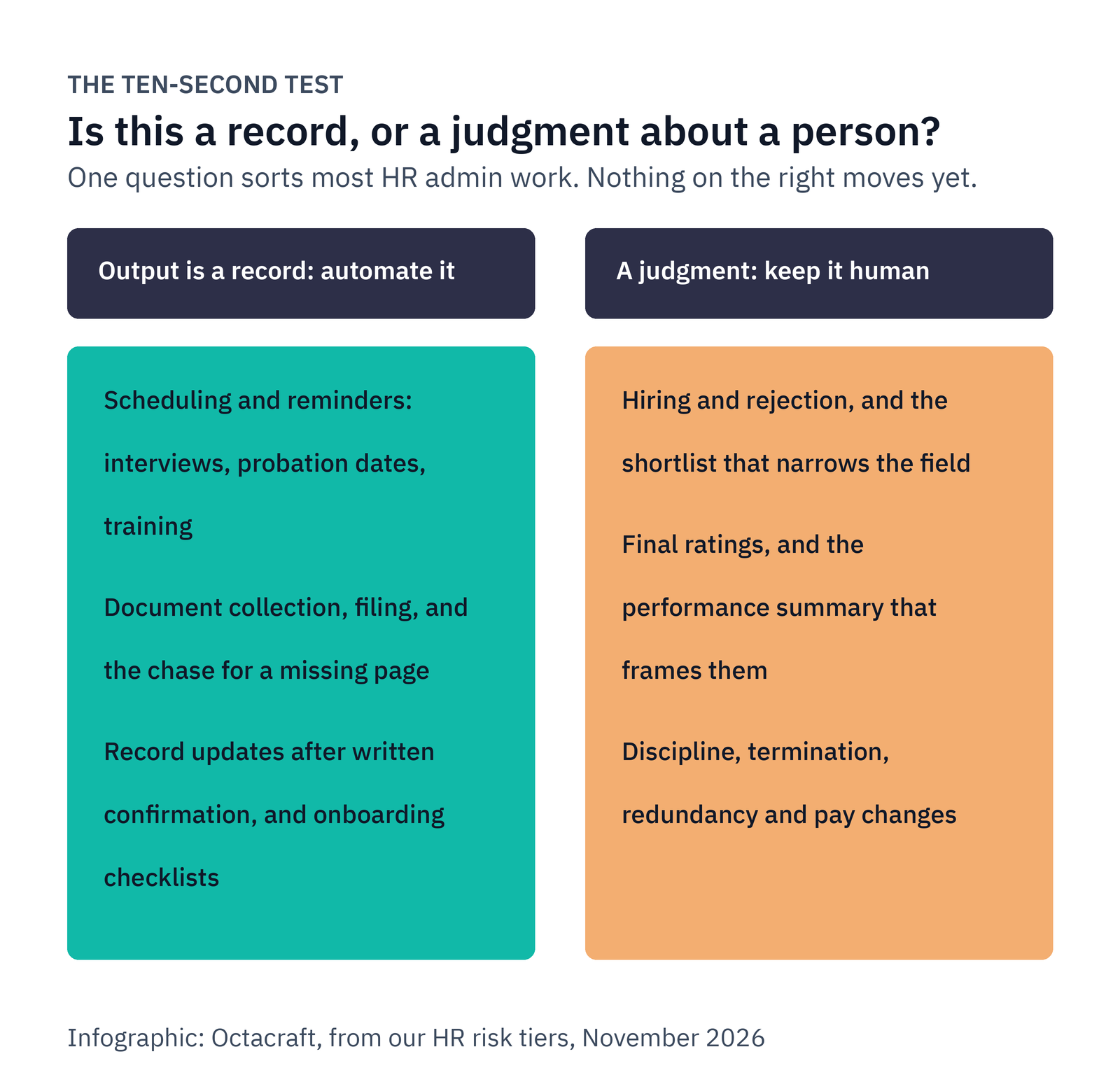
- HR automation is safe where the output is a record: scheduling, document collection, reminders, record updates and onboarding checklists.
- It is not safe where the output is a judgment about a person: hiring, ratings, discipline, pay changes and terminations. Software can prepare the file. A named person decides.
- Sort tasks by what a mistake costs, not by how hard they look. A one-field pay change sits in the highest tier. A messy onboarding pack sits in the lowest.
- Every HR automation task needs three things: a written definition of done, an audit line, and one named owner for exceptions.
- Two federal rules set the retention clock in the US: one year for personnel records, three years for payroll records.
A two-person HR team is onboarding eleven people this month. Each hire needs six documents, two signatures, a payroll record and a training slot. Nobody in the building thinks that is the best use of the week.
The obvious fix is HR automation. The hard part is not the software. It is agreeing which of those steps a machine can finish alone.
This guide draws that line for an HR director or COO at a 100 to 500 person firm. It gives you a ten-second test for any task, three risk tiers with the sign-off each one needs, and the compliance checks to run before the first workflow goes live.
What HR automation means, and what it does not
Short answer: HR automation is software that moves personnel work forward without a person re-keying it. It covers intake, scheduling, document collection, reminders, record updates and reporting. It does not cover a decision about a person, even when the software assembles the material for that decision.
That definition is narrower than the market uses. Vendors sell HR automation, screening tools and review tools under one label. Only some of that work can run without a person in the loop. Most suites bundle the decision tools into the same box.
Keep it apart from HR analytics. Analytics reads the record. HR automation changes it. An engine that blends the two will offer you a report as proof a workflow is safe.
The HR automation work that fits inside the definition is usually dull and repeatable. A form arrives and has to be filed. A start date moves and four systems need the new date. A document is missing and somebody has to ask for it twice. Each step has a clear end state, and a wrong outcome is easy to spot.
The line we draw, in one sentence
If the output is a record, automate it. If the output is a judgment about a person, a human owns it.
Apply that sentence to an HR automation request in ten seconds. A training reminder produces a record of who was asked and when. Automate it. A draft performance summary produces a claim about someone’s work. A person owns that, even if the software writes the first draft.
The test survives the awkward cases. A leave request that fits the policy is a record. A leave request that asks for an exception is a judgment, because someone has to weigh the team’s cover against a rule. Same form, different tier.
Where the output is a record, the failure is visible. A field is empty or a date is wrong, and the next person notices. Where the output is a judgment, the failure hides inside a number that looks reasonable.
Three risk tiers, sorted by consequence rather than complexity
Short answer: complexity tells you how long a build takes. Consequence tells you what a mistake costs the person on the other side of it. Sort by consequence. Complexity is the wrong axis for HR automation.
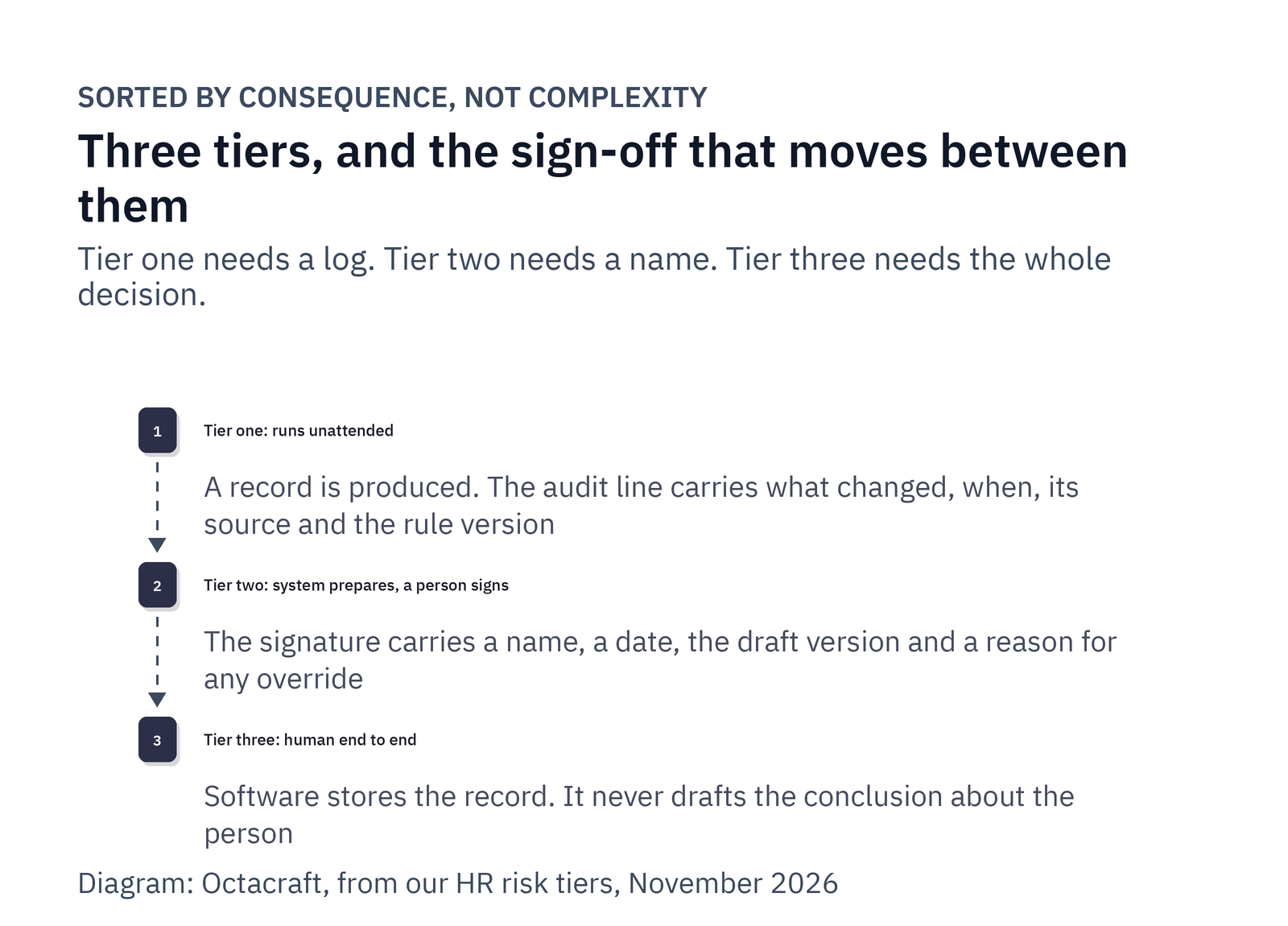
Tier one: safe to run unattended
Tier one HR automation produces a record and gets checked by the next reader. Scheduling. Document collection and chasing. Reminders for training, probation dates and policy acknowledgements. Record updates that follow a confirmed change. Onboarding checklists. Standard reporting from data already stored.
Each task in this tier has to leave an audit line. Four fields are enough: what changed, when, which source document it came from, and which rule version was applied. Without those four, a tier one task belongs in tier two until the log exists.
The benefit is that a mistake is caught in hours. A missing certificate shows up as an empty field before the person’s first day, not in a review eleven months later.
Tier two: the system prepares, a person signs
Tier two HR automation ends in a decision, and the software is allowed to assemble the case. A shortlist with scores attached. A performance summary with last quarter’s objectives beside it. A draft letter for a disciplinary meeting, a pay change or a rejected application.
The signature has to be a name, a date, the version of the draft that was approved, and a reason when the approver changes the recommendation. A shared inbox that clicks approve is not a signature. It records that somebody was at a desk, not that anyone read the file.
This tier holds most of the value and most of the risk. The person is faster because the file is assembled. The person is also anchored by whatever order the software chose. Give the approver the underlying documents, not only the summary screen.
Tier three: keep human end to end
Tier three is a decision about a person where the cost of a wrong call is high and hard to reverse. Hiring and rejection. Final ratings. Disciplinary outcomes. Pay setting. Termination and redundancy selection. Any decision that turns on a protected characteristic. Investigations.
Software can store the record in this tier. It should not draft the conclusion. No part of HR automation belongs past that point. The moment a model writes the reason for a termination, you have a document you will have to defend in a room you do not control.
Where does the data come from, and where does it end up?
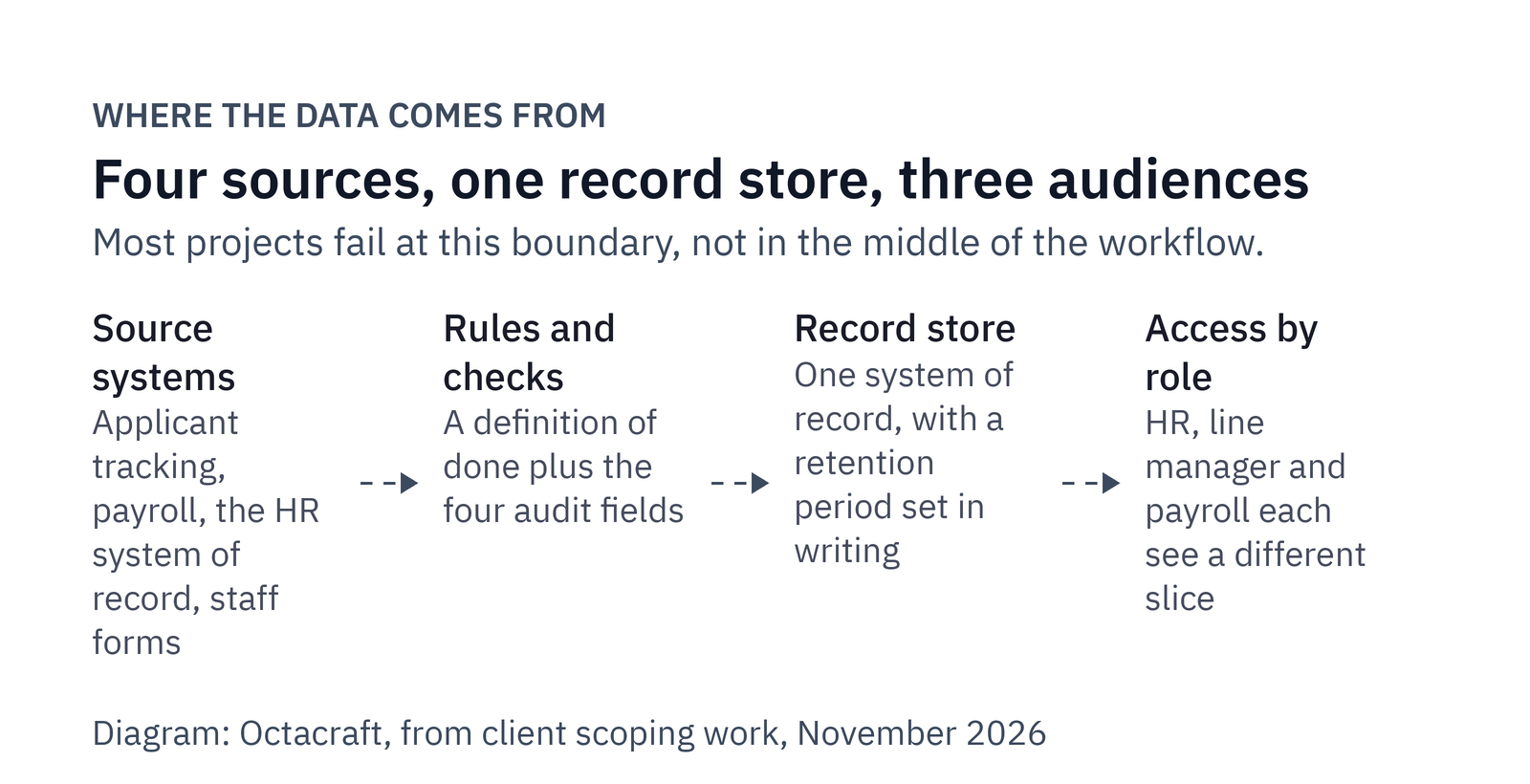
Short answer: Personnel data arrives from four systems: an applicant tracking system, payroll, the HR system of record, and forms filled by staff or candidates. It should land in one record store with role-based access, a stated retention period and a log of every read and change.
Most HR automation projects fail at the boundary, not in the middle. The workflow works, and then nobody can say which system holds the true start date, or who else inside the company can see a sickness record. HR automation can only move data it can name a source for.
Two US rules set a floor for retention. Personnel and employment records must be kept for one year from the date of the record or the personnel action, whichever is later, under 29 CFR 1602.14. Payroll records must be kept for at least three years from the last date of entry, under 29 CFR 516.5.
Retention is a policy decision, not an HR automation default. A tool that deletes at 90 days and a rule that requires one year are incompatible, and the gap surfaces in the first investigation. Set the period in writing, then configure the store to match it.
Access is the second half. Three audiences usually need sight of a personnel record: HR, the line manager and payroll. Each needs a different slice. The line manager needs dates and outcomes, not medical notes. Payroll needs the numbers that drive pay, not the reason for a disciplinary step.
The artifact: our risk tiers for HR tasks
The table below is the version we use when we scope an HR automation workflow. It takes a task, assigns a tier, names who signs and states the reason in one line. Copy it, then argue with the rows. The argument is the useful part.
| Task | Tier | Who signs off | Why this tier |
|---|---|---|---|
| Interview scheduling and reminders | 1 | No signature needed | The output is a calendar entry and a message |
| Collecting right-to-work and tax documents | 1 | HR operations checks the pack | The output is a document in a folder with a date |
| Onboarding checklist for a confirmed start date | 1 | HR operations | The output is a list of completed steps |
| Updating an address or bank detail after written confirmation | 1 | Payroll confirms before the run | The output is a field change with a source attached |
| Reference check request and reply record | 2 | Recruiter, then hiring manager | The reply is an opinion a person must read and record, not a field |
| Performance summary draft | 2 | Line manager, then HR director | The draft steers the rating even when it is edited |
| Leave request that needs a policy exception | 2 | Line manager with HR advice | The output is a judgment about cover, not a balance update |
| Shortlist ranking from screening scores | 2 | Hiring manager, with the audit file | The output narrows a field of applicants, so adverse impact applies |
| Pay change letter | 3 | HR director and finance lead | A wrong number is a legal and personal problem, and the letter is the evidence |
| Final performance rating | 3 | Line manager and HR director, jointly | The rating follows the person into pay, promotion and dismissal |
| Termination or redundancy selection | 3 | HR director and a second executive | The decision is contested, and the record is the defense |
Two rows moved after a client pushed back, and both moves went up a tier.
We first placed the performance summary draft in tier one, because the output is a document and the manager edits it anyway. The HR director disagreed. Managers accept what they are shown, and a summary that lists three weaknesses before the manager has formed a view sets the frame. It moved to tier two, with the underlying notes attached.
We also had the reference check in tier one, since a request and a reply look like records. A recruiter pointed out that a reference is an opinion about a person, sent by a third party who may say more than they would write down. It moved to tier two: the software sends and files, and a person reads the reply before it lands in the file.
What each tier costs to run, and who to call when it misfires
Short answer: we have not measured a run cost for HR automation by tier, so this section prices the human side in time and names the owner. The license is the small number. The exception path is the one that grows, and it grows fastest in tier two, where every case needs a reader.
Tier one HR automation costs supervision, not decisions. Someone checks the exception queue once a day and the audit log once a week. When it misfires, the symptom is a wrong or missing record: a start date that never reached payroll, a document filed under the wrong person. Escalate to HR operations, who own the record store.
Tier two HR automation costs reviewer time per decision, and that time does not shrink because the file is assembled. When it misfires, the symptom is a signature that was never really given: a batch approval at 6pm, or a manager who signed a summary they did not read. Escalate to the named approver first, then to HR for the pattern. Three batch approvals in a month is a design problem, not a discipline problem.
Tier three costs what it always cost, because the decision stays human. What changes is the record around it. When it misfires, the symptom is an incomplete file: no date, no reason, no second signature. Escalate to the HR director, and treat the gap as a process failure to fix before the next case.
One pattern holds across the three tiers. The cost follows the number of exceptions, not the number of transactions. Automate a task with a 40 percent exception rate and you have bought a queue.
HR automation does not remove the owner of a decision. It moves the work in front of them, and the owner still answers for the outcome.
Where the software you already own sits in these tiers
Short answer: most mid-size firms already run tools that touch personnel data. Sorting them by tier tells you where to start and which settings to leave alone. Four categories cover most of the estate.
Most of the HR automation a firm already owns sits in one of those four categories, usually without anyone calling it that.
Payroll and attendance software: tier one, with one exception
Payroll and attendance software is tier one HR automation for data capture: hours, shifts, absence codes and the field updates that follow a confirmed change. Where it stops being tier one is any rule that decides a person’s pay without review, such as an automatic deduction or a shift penalty applied by an algorithm nobody has checked against the contract.
Employee performance management software: tier two at most
Employee performance management software sits in tier two when it assembles objectives, feedback and review drafts, and in tier three the moment it produces a rating. That tool should prepare and never conclude. The settings that matter are who can see a draft, who can edit it, and whether the final rating records the person who assigned it.
Employee communication platforms: the safest place to start
Employee communication platforms are the safest HR automation to start with. Most of the work is a message with a record attached: a policy acknowledgement, a shift change notice, a reminder with a due date. Keep personnel detail out of the channel. Send the link, not the file, and log who opened it.
Employee productivity tools: watch the monitoring line
Employee productivity tools cross a line when they measure the person rather than the work. Time tracking for billing is a record. Screenshot capture, keystroke counts and idle-time scoring produce judgments about behavior, which puts them in tier two or three depending on what the data feeds.
That is the part of HR automation that needs the hardest conversation, because the data arrives quietly and the decision it informs is rarely written down. If nobody can name the decision, treat the tool as tier three.
Compliance edges to check before you automate
Short answer: three checks carry most of the exposure in HR automation. Selection tools must be tested for adverse impact. Screening and ranking need the notices and audits local law requires. Automated decisions need a human route to review and contest. Build the evidence, because the guidance on top of the statutes keeps changing.
Start with selection. Under the federal Uniform Guidelines, a selection rate for any race, sex or ethnic group is measured against the rate for the highest group. A rate below four-fifths of that figure is generally treated as evidence of adverse impact (29 CFR 1607.4(D)). A screening tool that filters applications is a selection procedure. If you cannot produce selection rates by group, you cannot answer the question.
Then the local rules that reach HR automation in your city or region. New York City’s Local Law 144 requires a bias audit within one year before an automated employment decision tool is used. It also requires a published summary of the audit, and notice to candidates at least 10 business days before use. Enforcement began on 5 July 2023, according to the NYC Department of Consumer and Worker Protection.
In the EU, the AI Act classifies AI used for recruitment, selection, promotion, termination and task allocation as high risk under Annex III. The obligations for those systems apply from 2 December 2027, after the AI Omnibus entered into force on 27 July 2026, per the European Commission.
Then the decision itself. Article 22 of the GDPR matters when a decision is based solely on automated processing and has legal or similarly significant effects. The person then has a right not to be subject to it, with narrow exceptions. Those exceptions carry a right to human intervention, to express a view and to contest the outcome.
Finally, access and retention, covered above. An auditor will ask three questions: who could see this record, how long was it kept, and what changed it. If the answer takes a week to assemble, the workflow is not ready.
A 30-day sequence for the first safe workflow
Short answer: pick one tier one task, run it alongside the manual version for two weeks, then retire the manual path on a stated date. One task, one owner, one retire date.
Days 1 to 7: choose the task and write the definition of done
Choose a task with a low exception rate and a visible end state. Document collection is the usual first pick. Write the definition of done in one line: what the record looks like when the task is complete. Then write the four audit fields and name the person who owns exceptions.
Days 8 to 14: run it in shadow
The software does the work, and a person also does the work by hand. Compare the two outputs daily. The differences tell you what the definition of done missed. Most of them are about edge cases: a document that arrives as a photograph, a name that differs between systems, a start date that moved twice.
Days 15 to 21: put it in front, keep the manual path warm
Now the HR automation leads, and the manual path stays available for exceptions. Publish the exception rule: who decides, in what time, and what gets logged. Check the audit log every day this week. A log nobody reads is a log that will be wrong when it matters.
Days 22 to 30: retire the manual path on a date
Set the date in the calendar and tell the team. Keep the audit log for the retention period, not for a month. Then start the second task, and expect it to take less time than the first. The first HR automation build rarely stays at one task for long.
If the process is not written down yet, fix that first. Process documentation fields a tool can run covers the eight fields that make a workflow buildable. The approval steps that slow it down are in five approval bottlenecks that cost you a week every month.
What to tell your team before the first automation goes live
People assume the worst when HR automation appears without explanation. They assume a decision is being made about them by a system they cannot see. Five lines, said out loud in a team meeting, prevent most of that. Announce HR automation as a change to who types, not to who decides.
Say what the software does, in plain words: it collects the documents and sends the reminders. Say what it does not do: it does not rate, rank or decide. Say who decides: a named person, and their name. Say where the record lives and who can see it. Say how to flag a wrong record, and what happens next when they do.
Then hold that line in public. The first time a manager asks the tool to score someone, the answer is no. That answer, given once where people can hear it, is worth more than the policy document.
Where this fails
Three failures account for most of the damage we see in HR automation.
The first is tier creep. It is the most common way HR automation goes wrong. A tier one tool picks up a scoring field because a manager asked for it, and nobody reclassifies the task. Six months later the onboarding tool is ranking candidates. Review the tier whenever a field changes, not once a year.
The second is a signature without a name. An approval step that records a role or a shared mailbox cannot answer who read the file. Automate the assembly, and keep the signature personal.
The third is the audit trail that expires first. Tool logs often rotate in weeks, while the retention period runs in years. If the only evidence of a change lives in a log that gets recycled, the audit trail is not there when it is needed.
The wider pattern is familiar to anyone who has watched an agent run into a process edge. Why AI agents for business operations stall at a process edge covers what that looks like in practice. For the tier one case with the numbers behind it, read employee onboarding paperwork: from three days to one.
Which HR tasks can be automated?
HR automation covers scheduling, document collection, reminders, record updates, onboarding checklists and standard reporting, provided each task leaves an audit line. Anything that ends in a judgment about a person, such as hiring, ratings, discipline or pay, stays with a named human, even when software prepares the file.
Should AI make hiring decisions?
No. A screening tool may filter and rank, but a person makes the decision and can explain it. Screening is a selection procedure, so adverse impact rules apply, and a decision made solely by automated processing can trigger data protection rights to human review.
Is payroll and attendance software the same as HR automation?
Partly. Hours, shifts, absence codes and confirmed field changes are records, so that work is tier one HR automation. It stops being safe when a rule decides pay without review, such as an automatic deduction or penalty that nobody has checked against the contract.
How long should we keep HR records?
In the US, keep personnel and employment records for one year from the record or the personnel action, whichever is later, under 29 CFR 1602.14. Payroll records run for three years from the last entry, under 29 CFR 516.5. Set one written period that meets every rule that applies to you. HR automation should delete on the same clock the rule sets.
Who should sign off on a tier two decision?
A named person with the authority to change the recommendation, not a shared mailbox. Record the name, the date, the draft version and the reason for any override. If the approver cannot say why they agreed, the step has become a formality and the tier has failed.
Frequently asked questions
Short answer: these four come up in almost every scoping call. Each answer is the short version; the sections above carry the reasoning.
What is the first HR task to automate?
Document collection. The task has a visible end state, a low exception rate and an obvious owner. Most HR automation starts there because a missing page is easy to spot, and the first month tells you how often a pack arrives incomplete.
Does HR automation replace HR staff?
It replaces typing, not judgment. The record work shrinks: chasing forms, re-keying changes, sending reminders. The review work does not, because every tier two decision still needs a person who can change the recommendation and say why they did.
How do we audit an HR automation workflow?
Read the log, not the dashboard. An HR automation audit checks four fields per change: what changed, when, which source document it came from, and which rule version applied. Then compare a sample of ten records against the source documents by hand.
What should we do when an automated HR process gets a record wrong?
Correct the record, then read the log to find the step that failed, and fix the rule rather than the single record. Log the case in the exception queue. Three identical errors in a month point to a definition of done that missed a case, not to a careless employee.
If you are sorting tasks into tiers and want a second read, bring us your HR automation task list. We will mark each row, and tell you which ones we would move.
Philip Bassey is Octacraft’s Chief of Staff. As part of his responsibilities, he oversees the interdepartmental activities to see that our processes are documented and those that need publishing are published.

Philip Bassey is Chief of Staff at Octacraft, where he oversees the interdepartmental activities that keep our processes documented and the ones worth publishing published. He writes about operations that are engineered into systems instead of held together by memory.