Process documentation templates that survive staff turnover
The short version
- A document survives turnover when it names the trigger, the inputs, the systems, the decision points, the exceptions, the owner and the review date. Eight sections, one page.
- Most process documents fail for one of three reasons: they describe the happy path, they assume context that walks out with the author, or nobody owns the review.
- The five templates here each fit a different job: a one-page process card, a decision table, an exception log, a handoff map and an access checklist.
- A process documentation template you cannot update in five minutes will be wrong within a quarter. Length is a maintenance decision, not a quality decision.
- Test the document by handing it to someone who has never run the process, then saying nothing while they try.
The supplier onboarding process lives in two heads. One of them has handed in notice. The folder marked “procurement procedures” holds a document that was accurate two years ago, and the person leaving says so out loud in the handover meeting.
That is the week a process documentation template has to prove itself. Not in an audit, where the document only has to exist. In the first week after the author’s chair is empty, when somebody else has to run the work from the page.
The turnover that exposes this is ordinary. Median employee tenure in the United States was 4.1 years in January 2026, according to the Bureau of Labor Statistics, and 20.6 percent of wage and salary workers had been with their employer for a year or less. A document that only its author can use is a document with an expiry date stamped on it.
What follows is the pack we use: eight sections, five templates, and the three events that force a review. Copy any of it.
Why most process documents die with their author
Three failures account for most of it, and none of them is laziness.
The happy path problem. A document written from memory records the normal case. Invoices arrive on time, the purchase order matches, and payment runs on Friday. Nothing on the page explains what to do when three of those four things are false, which is most weeks.
The assumed context problem. The author knows that only one of the three note fields on a supplier form matters. They do not write it down, because to them it is obvious. The knowledge leaves with the badge.
The ownership problem. ISO 9001:2015 requires documented information to be controlled, and ISO’s own guidance on clause 7.5 makes a distinction worth borrowing: the standard asks for a documented quality management system, not “a system of documents”. A document with no named owner is not controlled. It is stored.
Each of the eight sections below closes one of those gaps. A process documentation template that assumes the reader sits beside its author is a note to self, and notes to self get filed.
Process documentation template: the eight sections that survive a handover
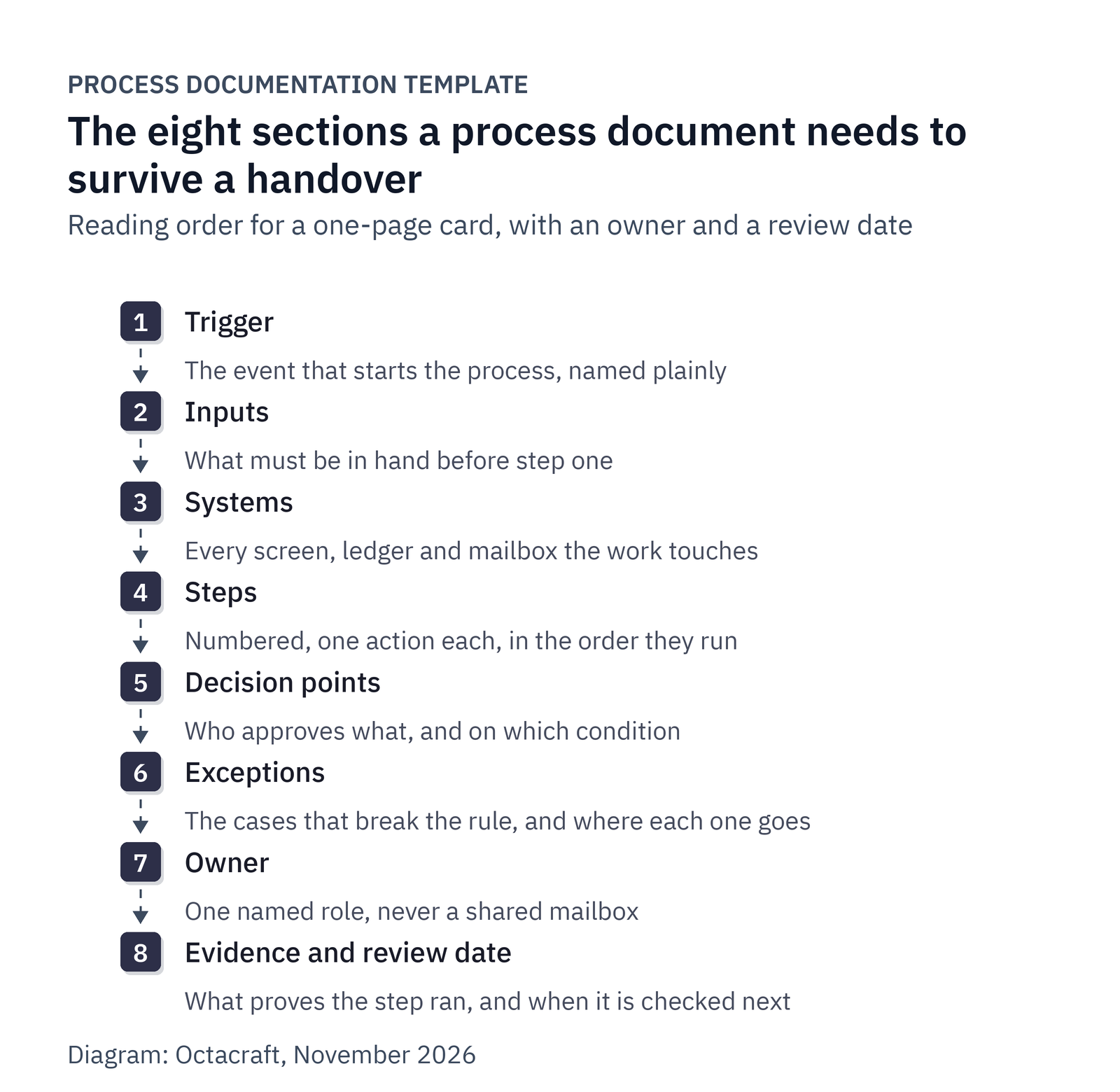
Write them in this order. The order matters more than the wording, because it follows the questions a new person asks. Where does this start. What do I need in front of me. Which screen. What do I do. Who decides. What if it is wrong. Who do I ask. How do we know it happened.
One variation matters before you start. When software will run a step rather than a person, the fields narrow to what a machine can read, which is the version we laid out in documenting a process for automation. This process documentation template is written for the human reader who has to run the work next month.
Trigger, inputs, systems. The trigger is the event that starts the work, named as a thing that happens rather than a topic. “A supplier invoice arrives in the accounts mailbox” is a trigger. “Invoice processing” is a heading. Inputs are what must be in hand before step one, and systems are every screen, ledger and mailbox the work touches. A process documentation template asks for inputs before steps because most rework comes from a missing input discovered at step four.
Steps and decision points. One action per numbered step, in the order they run. Decisions get their own section, with the condition and the approver written as a pair: over 5,000 needs the finance lead, under it the buyer approves. If a step still needs the words “as needed”, it is two steps that have not been separated yet. Every process documentation template we have rewritten carried at least one step like that.
Exceptions. The cases that break the rule, each with a destination. Missing document, hold the record. Changed bank details, repeat the call and log it. Duplicate supplier, merge rather than create. This is the section a process documentation template loses first, because exceptions are the part the author resolves from memory. An exception with no destination sends the reader to a colleague, which is how the document stops being used.
Owner, evidence and review date. One named role, never a shared mailbox. Evidence is what proves the step ran: a portal approval, a call note, a record ID. The review date is the line that makes the document a living thing rather than an artifact. A process documentation template without that last line is a snapshot, and snapshots age in public.
What format should a process document use?
Match the format to how often the process runs and how many branches it has. Frequent work with a short happy path needs a one-page card. Approval work that changes with amount or risk needs a decision table. Anything a regulator will read needs a version number and a named owner printed on the page.
A standard operating procedure is a written instruction for one repeatable task. It has a start, an end, the steps between them, and one person accountable for the result. That definition is narrow on purpose. It keeps the procedure from swallowing the process around it, and it is the unit a process documentation template is built from.
Process documentation format: one page, or twenty?
One page is the right answer whenever the work has fewer than about fifteen steps, one owner and no regulator reading over your shoulder. The constraint is not readability. It is maintenance. A page gets updated. A twenty-page procedure gets rewritten once, admired, and then quietly ignored for two years.
Length earns its keep in two cases. A regulator or a certification body reads the document, or the process carries more exceptions than steps. Both cases exist. Neither is the default, and neither excuses a process documentation template where nobody can find step four.
Process documentation sample: the card filled in
Here is a filled card for a process most firms run badly: setting up a new supplier. The roles are generic on purpose, so swap in your own titles and system names before you use it. This card is the process documentation template most teams should start with.
| Section | Filled in |
|---|---|
| Trigger | A buyer decides to use a supplier that is not yet in the ledger |
| Inputs | Supplier legal name, tax ID, bank letter, insurance certificate, three quotes |
| Systems | Purchasing portal, ERP supplier master, bank verification call, document store |
| Steps | 1 Collect documents. 2 Verify bank details by phone. 3 Create the supplier record. 4 Attach the documents. 5 Set payment terms. 6 Tell the buyer it is live. |
| Decision points | Buyer approves the quote. Finance lead approves any prepayment. Controller approves terms beyond 45 days. |
| Exceptions | Missing insurance certificate: hold the record, do not order. Bank details changed after setup: repeat the call and log it. Supplier exists under another name: merge, do not duplicate. |
| Owner | Procurement lead |
| Evidence and review date | Portal approval, verification call note, supplier record ID. Review when the ERP is upgraded or the procurement lead changes. |
Notice what the process documentation template leaves out. No background section, no rationale paragraph, no screenshots of a screen that will change at the next upgrade. What it keeps is the part a new person cannot guess: which call to make, who approves the exception, and what proves the step happened. A process documentation sample that reads like a policy is usually a policy.
The five templates, and the process each one suits
One process documentation template per job. Reaching for the wrong one is how a two-page process turns into a nine-page procedure that nobody opens.
| Template | Fields it holds | Format | Suits | Length |
|---|---|---|---|---|
| One-page process card | Trigger, inputs, systems, steps, decision points, exceptions, owner, evidence and review date | One page, numbered steps down the middle | Frequent work with a short happy path | One page |
| Decision table | Condition, approver, limit, escalation | Rows of conditions against approvers | Approvals that change with amount, risk or customer | One page |
| Exception log | Date, step, what broke, who fixed it, what changed in the document | Running list with a review column | Processes where the same exception repeats | One page, grows with entries |
| Handoff map | Step, from role, to role, what must be true at the handoff | Table or a left-to-right chain | Work that crosses teams or systems | One page |
| Access checklist | System, access level, who grants it, day-one need | Checklist | Anything a new person needs on day one | One page |
One-page process card, for frequent and simple work
Use the card when the work runs weekly or more often and follows one main path. It is the process documentation template for the ordinary case, with all eight sections on one page and the steps numbered down the middle. If the card needs a second page, the process is either two processes or one with branches that belong in a decision table.
Decision table, for branching approvals
Use the table when the approver changes with the amount, the risk or the customer. Rows are conditions, columns are approvers, and every cell holds a limit or an escalation. This process documentation template replaces the sentence “approved per the delegation of authority”, which stalls more approvals than any other line in a procedure. Our piece on approval bottlenecks shows what those stalls cost across a month.
Exception log, for the cases that break the rule
Use the log when the same exception gets solved from scratch every few weeks. One line per event: the date, the step, what broke, who fixed it, and what changed in the document as a result. That last column is the point. A log that records pain without changing the page is a diary, and a process documentation template without one repeats the same fire every quarter.
Handoff map, for work that crosses teams
Use the map where the work leaves one team and enters another. Each row names the step, the role it leaves, the role that receives it, and what must be true at the moment of handoff. This is the process documentation template that shows where work waits, without a software purchase.
Access checklist, for anything needed on day one
Use the checklist for every system, folder and mailbox the process touches, with the access level and the person who grants it. This process documentation template is what turns a page into onboarding material. Without it, a new hire spends the first week asking for permissions instead of running the work. The same list drives the paperwork in our piece on onboarding documents.
The handover test: give it to someone who has never run the process
A review meeting tells you whether a document looks complete. It cannot tell you whether it works. The handover test can, and it costs one afternoon.
Pick one card. Hand it to someone who has never run that process and who has no reason to be polite about it. Ask them to work through it on a real case while you sit silent. Note the first place they stop, and note whether they stopped because the page was wrong or because they were afraid to act. A process documentation template fails the first way. An owner who never handed over authority fails the second, and that needs a name on the step, not another paragraph.
Fix one section of the process documentation template. Run the test again with a different person. Repeat until nobody stops. That is the whole method. It is also the only honest way to claim a process documentation template works, which is why we will not hand you a ramp-time figure we have not measured ourselves.
Writing rules that keep a document usable
Five rules carry most of the quality, and each one is a rule because it was broken in a document that then failed.
Write in the active voice, so each sentence names who acts. Name the system rather than “the system”. Name the owner as a role, not a department. Date the version and keep the previous one. Define every acronym at first use, because the new reader has not learned your shorthand yet.
Those five rules fit inside any process documentation template and they cost nothing to apply. Our note on metric definitions makes the same case for numbers that this list makes for steps.
Process documentation examples: three lines rewritten
Examples do more than rules, so here are three lines from documents we have read, with the rewrite that made each one usable. The version on the left is the one a new hire cannot act on.
“Invoice is checked against the PO per policy” becomes “Match the invoice total to the PO total in the ERP. If the difference is over 1 percent, send it to the buyer named on the PO.” “Supplier is verified” becomes “Call the number on the bank letter, not the number on the invoice, and write the time of the call in the supplier record.” “Report is circulated weekly” becomes “Send the stock report to the operations lead by Tuesday 10:00, and copy the finance inbox.”
Each rewrite adds the three things a process documentation template exists to capture: the system, the condition and the destination. None of them adds length. That is the trade worth making.
How to keep it current without a documentation project
Documents do not rot on a schedule. They rot at three moments, and each moment is a chance to correct them while the person who knows is still in the building.
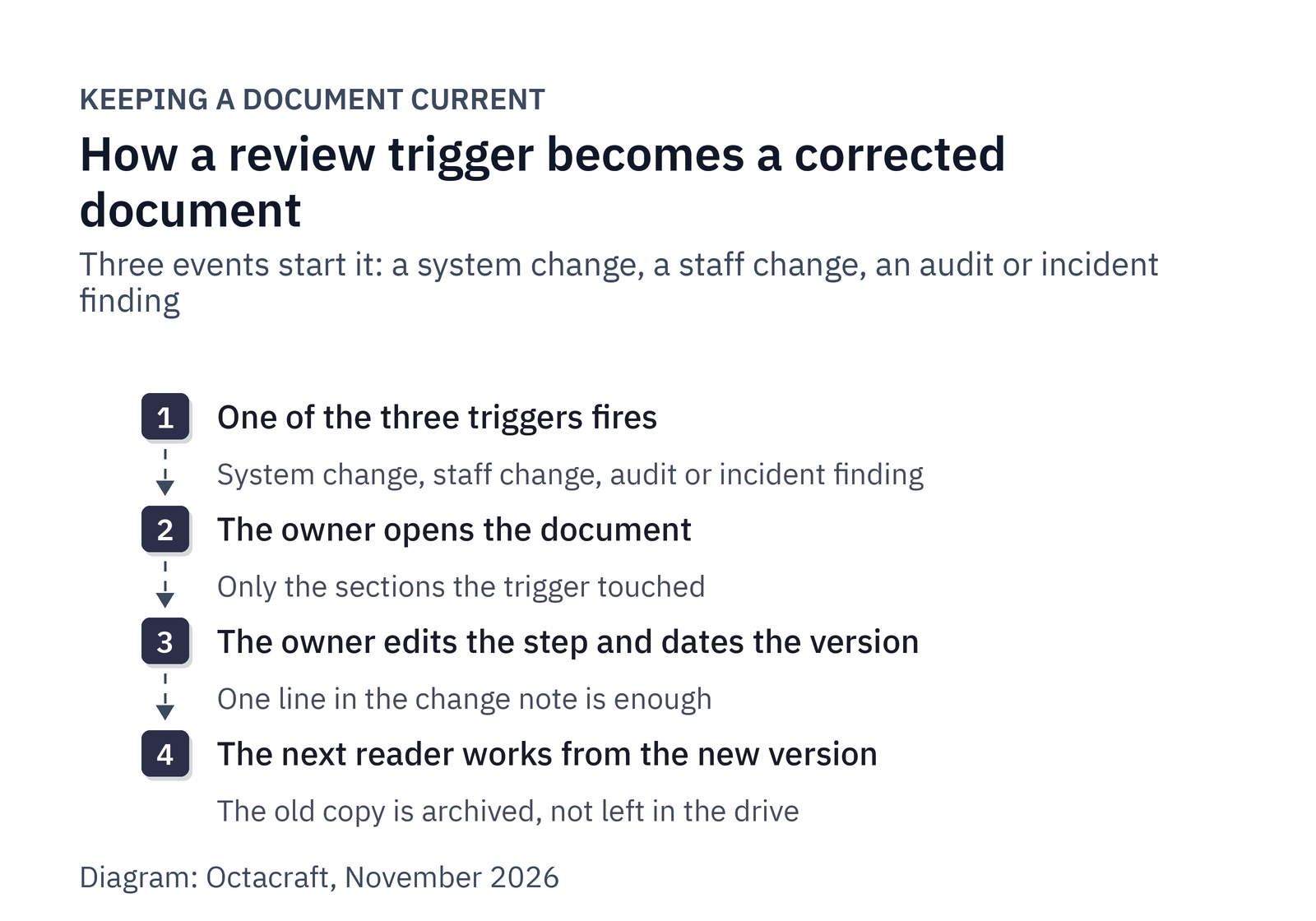
A system change. A new field, a different approval screen, a rule that moves. The person who makes the change updates the page in the same ticket. If that is too much to ask, the change is not finished. This is the trigger a process documentation template has to survive most often, because systems change faster than offices do.
A staff change. Someone leaves, joins, or swaps a step with a colleague. The handover meeting opens the document and reads it against what the person actually does. The gaps found in that hour are the gaps that would have cost a week.
An audit or incident finding. Something went wrong and the document did not prevent it. That finding is free evidence about which section is missing, usually exceptions or decision points.
The review date inside the process documentation template is the backstop for everything the three triggers miss. Set it twelve months out and treat it as a real appointment. A process documentation template with no date is a document that is presumed current, which is the most expensive assumption in the folder.
Where the document lives
Tooling is the least interesting decision here and the one teams argue about most. A wiki, a shared drive and a dedicated tool all hold a page, and any of them can hold a process documentation template. They differ on version history, findability, review reminders and access control, and those four differences decide whether the document survives.
| Dimension | Wiki | Shared drive | Process documentation software |
|---|---|---|---|
| Version history | Good, every version kept with a restore option | Good, earlier versions kept with a restore option | Good, versions plus a published copy |
| Findability | Good, search covers page titles and body text | Weak, depends on how the folders were named | Good, structured fields and filters |
| Review reminders | Partial, needs a calendar or a plugin | None built in | Good, a reminder per document |
| Access control | Partial, permissions at space level | Partial, permissions at folder level | Good, per document |
| Best for | Teams already writing in one place | A handful of documents and a small team | Regulated work with many owners |
| What it does not fix | A vague step, an unnamed owner | A vague step, an unnamed owner | A vague step, an unnamed owner |
Whichever you choose, the caveat is the same. Tooling does not fix a vague document. It gives a vague document better version history.
Process documentation software: what it adds to a template
Dedicated software adds three things a folder does not: a review reminder attached to the document, structured fields that survive a redesign, and permissions per document rather than per folder. Version history is not one of its advantages, because wikis already keep it. Confluence keeps every page version and lets you restore one, and Google Drive keeps earlier versions of a file with the same restore option. Pay for reminders and structure, not for history.
Process documentation tools: the three most teams already own
Most teams already have what a process documentation template needs. A wiki for pages people read, a shared drive for files people attach, and a ticketing system for the exceptions that need chasing. Start there. A team that cannot keep three pages current in a tool it already pays for will not keep thirty current in a tool it buys.
Move to dedicated software when the count passes what search can handle, or when a reviewer outside the team needs to confirm a document was checked on a date. Those are the two signals worth acting on.
The short answer
Eight sections: trigger, inputs, systems, steps, decision points, exceptions, owner, evidence and review date. Five templates: a card, a decision table, an exception log, a handoff map and an access checklist. Three triggers that force a review: a system change, a staff change, an audit or incident finding. One owner, named as a role, printed on the page with a date.
If you write only one of them this quarter, write the card for the process that would stop if the person who knows it left tomorrow. A process documentation template is not paperwork. It is the difference between a bad fortnight and a bad quarter.
Frequently asked questions
What should a process documentation template include?
Eight sections: trigger, inputs, systems, steps, decision points, exceptions, owner, evidence and review date. If a section is missing the reader guesses, and a guess at step four is where rework starts. One page holds all eight when the process has a short happy path.
How long should a process document be?
One page for most work. Two pages when a regulator reads it or when exceptions outnumber steps. Length is a maintenance decision: a page gets updated after a system change, and a twenty-page procedure gets rewritten once and then ignored.
Who should own a process document?
One named role, usually the person who supervises the work. Not a team mailbox, and not the author once they have left. The owner edits the page, dates the version, and answers for it when the handover test fails.
How often should a process document be reviewed?
At each of three triggers, plus an annual date printed on the page. The triggers are a system change, a staff change, and an audit or incident finding. The annual date in the process documentation template is the backstop for everything the triggers miss.
What is the difference between an SOP and a process document?
An SOP is a written instruction for one repeatable task, with a start, an end and an owner. A process document covers the wider flow, including the handoffs between teams and the exceptions that cross them. An SOP belongs inside a process documentation template, not instead of one.
If you want the five documents that worry you most read against this list before the next person hands in notice, bring them to us and we will read them with you.
Philip Bassey is Octacraft’s Chief of Staff. As part of his responsibilities, he oversees the interdepartmental activities to see that our processes are documented and those that need publishing are published. He writes about the work between a system going live and a team trusting it.

Philip Bassey is Chief of Staff at Octacraft, where he oversees the interdepartmental activities that keep our processes documented and the ones worth publishing published. He writes about operations that are engineered into systems instead of held together by memory.